
Commercial
Commercial Glazing Estimating Software: What a Bid Needs
Commercial glazing estimating software should take a bid from invite to proposal: takeoff, supplier quotes, cost codes, submittals. What to look for.
11
min read
•
October 12, 2026
Glazier is software for commercial and contract glazing contractors. It carries a bid from the general contractor's invitation through takeoff, supplier pricing, the estimate and a branded proposal, and after the award that same estimate becomes the job budget.
What to look for in commercial glazing estimating software
When you compare systems, ask to see one real bid go from invitation to proposal, then into a live job.
- A bid pipeline. Every invitation in one view, by stage, with an owner.
- Takeoff help. Openings, specs and dimensions pulled from drawings as a first pass your estimator confirms.
- Supplier quote tracking. Requests, totals and valid-until dates inside the estimate, converting to a PO on award.
- Cost codes and templates. Estimates every estimator builds the same way, and that become the job budget.
- Proposals and submittals. Branded documents generated from the estimate and tracked in the same system.
- Estimate versus actual. The budget from the bid compared live against purchase orders and labor once the job starts.
How we handle commercial estimating in Glazier
In Glazier, a commercial bid moves through one record from the invitation to the branded proposal, and after the award that same estimate becomes the job budget. Here is how each stage works, using a storefront package for a two-storey medical office as the example.
Invitation: every bid in one pipeline
Every invitation lands in a single bid pipeline, organized by stage from invite to award, with an owner on each bid. Management sees every open bid in one view without asking around, before anyone starts counting openings.
Say a general contractor sends the medical office storefront package with a two-week deadline. It goes into the pipeline at its first stage with an estimator named on it, so nobody has to remember it came in by email. Our bidding and preconstruction tools cover every step that follows.
Takeoff: a first pass your estimator confirms
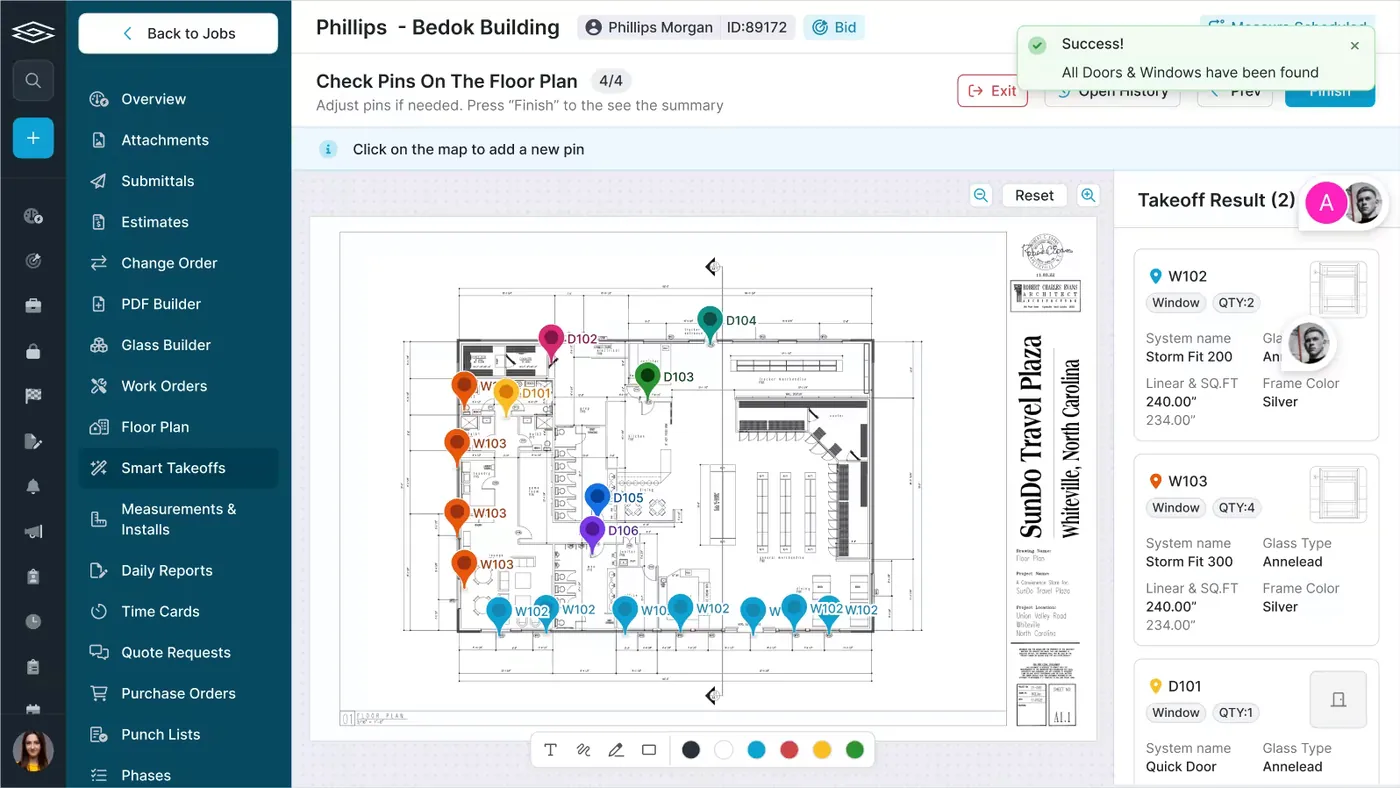
Our AI takeoff labels the openings and pulls specs and dimensions from the drawings. Your estimator checks that first pass instead of counting every opening by hand, which is how a team bids more jobs without adding estimating hours.
On the medical office, the estimator confirms each labelled opening against the elevations before any number goes on the bid.
Supplier pricing: quotes that stay with the bid
Glass, aluminum and hardware prices come from suppliers, and their quotes expire. In Glazier you import GDS and PartnerPak files or create quote requests from the job, then track each quote's total and valid-until date in one place. When the job is awarded, the quote you accepted converts to a purchase order.
.avif)
On the storefront package, the estimator sends the glass to one supplier and the aluminum to another. One quote comes back confirmed while the other still reads sent, and both sit on the job next to the estimate instead of in two inboxes.
Estimate: built on cost codes and templates
We tie the estimate directly to cost codes, and your team builds it from shared estimate templates. Two estimators pricing the same package get the same structure, and an owner can read any estimate at a glance.
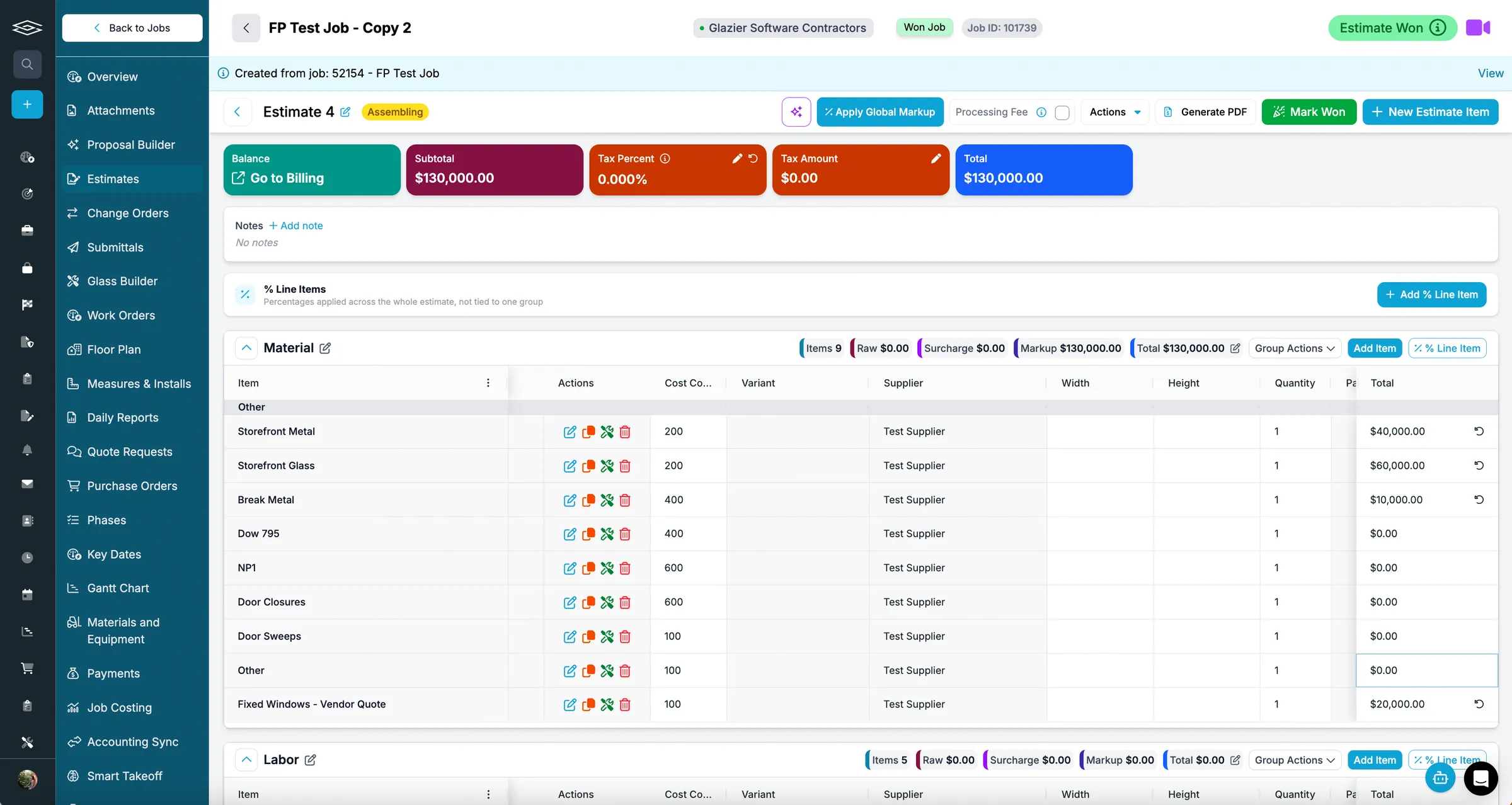
In the example, storefront metal and storefront glass go in under their own cost codes, the fixed windows are priced from a vendor quote, and the estimate rolls up to a single total for the bid.
Proposal: branded and out the same day
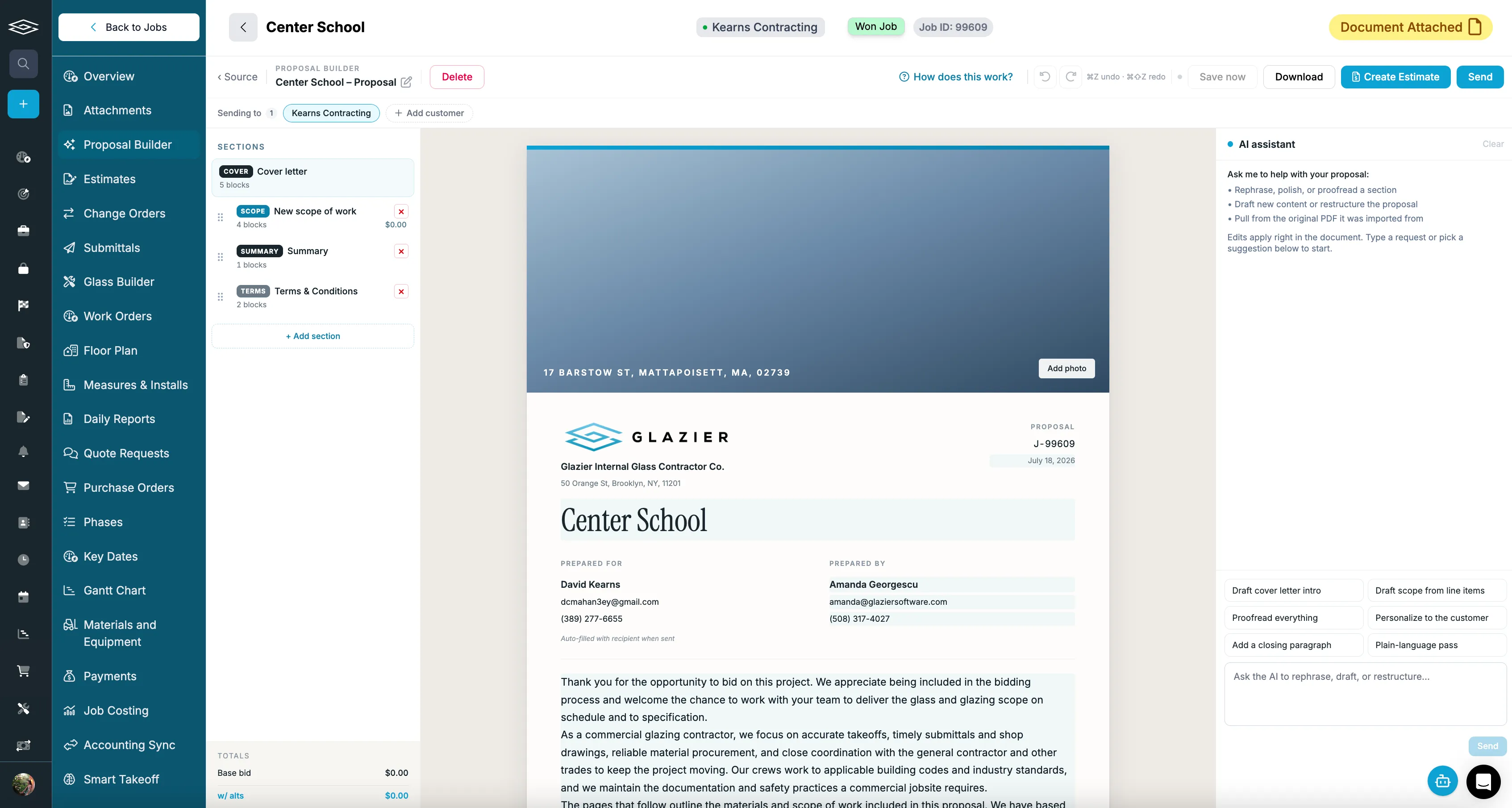
Proposals start from the estimate, an Excel file or a PDF. Our AI drafts a branded, professional proposal, laid out in sections such as the cover letter, scope and terms, which you can edit before it goes to the general contractor.
Submittals: sent and tracked after the award
Once the job is awarded, Glazier generates branded submittals with your logo and a cover sheet, emails them from the software, and tracks each one through revisions, approvals and denials.
.avif)
If the general contractor sends the window plan back for changes, the revision sits under the original with its own number, so the whole history stays in one place.
After the award: the estimate becomes the budget
The schedule of values is built from the estimate, so the bid and the job budget are the same numbers. Our job costing and billing compares costs against that budget live, with glass, metal, labor and freight broken out, and tracks change orders from issued to approved to completed so approved work does not go unbilled. Pay applications are generated from the job data, as covered in our guide to AIA billing.
.avif)
American Glass & Glazing, which does mostly commercial and restoration work, saw this directly. Before Glazier, DJ there told us: "I'd spend hours just compiling a quote. It wasn't scalable, and it wasn't sustainable as we grew." With us, they reduced quoting time from hours to just 20 minutes for commercial jobs, as their customer story describes.
A worked example: one storefront bid from invite to first pay app
Picture a job like this one. The numbers are made up for illustration. A general contractor invites you to bid the storefront package on a two-storey medical office, due in two weeks.
The invitation goes into the bid pipeline with an estimator named on it. The AI takeoff labels the openings on the drawings, and the estimator confirms them against the elevations instead of counting every opening by hand.
The estimator sends glass to one supplier and aluminum to another from the job's quote requests. The estimate comes together on cost codes: $40,000 of storefront metal, $60,000 of storefront glass, $10,000 of break metal and $20,000 of fixed windows priced from a vendor quote, for $130,000.
The AI drafts the branded proposal from that estimate, and it goes to the general contractor the same day. When the job is awarded, the accepted supplier quotes convert to purchase orders and the schedule of values is built from the same $130,000.
The outcome: one number serves as the bid, the budget and the basis of the first pay application, and nobody retyped it. Job costing then shows the costs posting against that budget while the job is still running.
Many commercial jobs bill on the AIA G702 payment application, filed with a G703 continuation sheet that breaks the contract sum into a schedule of values.
Want to see a storefront bid go from the invitation to the first pay application in one record? Book a Glazier demo and see the whole job in the product.
What commercial glazing estimating software has to handle
A bid passes through the same stages whether it is a small storefront package or a full curtain wall job.
Unlike service work, a commercial bid is not won at the door. It comes in as an invitation from a general contractor, with drawings, a spec book and a deadline.
Estimators turn that into openings, quantities, supplier pricing and labor, then into a number and a proposal. Every step that happens in a separate spreadsheet or inbox is a place for a miss.
| Stage | What the software must do | What goes wrong without it |
|---|---|---|
| Invitation | Put every bid invite in one pipeline with an owner | Invites sit in five inboxes and some are never answered |
| Takeoff | Turn drawings into openings, specs and dimensions | Counting by hand limits how many jobs you can bid |
| Supplier pricing | Request, compare and track supplier quotes | Prices expire or get lost in email threads |
| Estimate | Build the number against cost codes | Every estimator prices differently and nobody can check it |
| Proposal | Produce a branded proposal from the estimate | The proposal is slow and looks improvised |
| Submittals | Generate, send and track submittals | Versions and approvals get chased by hand |
| Award | Hand the estimate to the job as its budget | The budget is rebuilt from scratch, and actuals never meet the estimate |
Invitation: one pipeline for every bid
Invitations to bid arrive from email, referrals, GC portals and your website. Without one place to hold them, nobody can say what the company is bidding on right now, and a good job can be missed because the invite was in the wrong inbox.
The estimating system should collect every invitation into a pipeline organized by stage, with an owner on each bid, so management can see what is coming before anyone starts counting openings.
Takeoff: where volume is decided
Takeoff is the slowest, most error-prone part of commercial glazing estimating. When every opening is counted by hand, you have to choose which jobs to bid, and volume stays capped by how many hours your estimators have.
Good software speeds up the first pass. It should label openings and pull specs and dimensions from the drawings, so the estimator confirms a takeoff instead of building one from nothing. A first pass you check is faster and safer than a count done from scratch late at night before a bid deadline.
Supplier pricing: keep quotes tied to the bid
Glass, aluminum and hardware pricing changes, and supplier quotes expire. When quote requests live in email, it is hard to know who sent what, which prices are still valid and which numbers made it into the estimate.
Storefront estimating software, curtain wall estimating software and any commercial glass estimating software all need this loop inside the estimate: request pricing, track each quote's total and valid-until date, and convert the accepted quote into a purchase order when the job is awarded.
Estimate: build it against cost codes
An estimate that lives in a spreadsheet is a one-off. Each estimator builds it differently, owners cannot review it at a glance, and after the award there is nothing to measure the job against.
The fix is an estimate built against cost codes, from templates every estimator uses. Then the estimate is consistent across the team, and it becomes the budget that purchase orders and labor are compared to once the job is running. Glazier ties your estimate directly to cost codes, with estimate templates for consistency across estimators.
Proposal and submittals: look the part, and keep track
The proposal is what the general contractor actually reads. It should come straight from the estimate and go out the same day with your branding on it.
After the award, submittals start. Putting them together, managing versions and chasing approvals eats estimator and project manager hours. Software should generate branded submittals, send them, and track revisions, approvals and denials in the same job.
Why spreadsheets stop working on commercial bids
A spreadsheet can price one bid. It cannot run a bidding operation. The cracks show as volume grows:
- Invitations, drawings, supplier quotes and proposals live in different places.
- Each estimator has a personal template, so two people price the same job differently.
- Supplier prices expire without anyone noticing.
- After the award, the job is budgeted again from scratch, so you never learn whether the estimate was right.
That last point is the expensive one. If the estimate never becomes the budget, you cannot compare estimated against actual costs, and the same pricing mistakes repeat on the next bid. In Glazier, the schedule of values is built from the estimate, so the bid and the job budget are the same numbers.
To see a commercial bid go from invitation to proposal, and into a live job budget, book a Glazier demo.
Frequently Asked Questions
What is commercial glazing estimating software?
Commercial glazing estimating software takes a glazing bid from the invitation to the proposal on one record. It tracks the lead, does the takeoff from drawings, collects supplier pricing, builds the estimate against cost codes, and produces the proposal and submittals. The point is that the estimate becomes the budget the job is later measured against, instead of a spreadsheet nobody opens again.
Is storefront estimating software different from curtain wall estimating software?
Storefront and curtain wall estimating share the same workflow; the takeoff is what differs. Storefront bids are mostly counts and sizes of openings and frames, while curtain wall bids carry more engineering, more supplier pricing and longer lead times. Either way you need the openings, the specs and the supplier quotes in one estimate.
Can AI do a glazing takeoff?
AI can do the first pass of a glazing takeoff, but an estimator should confirm it before the number goes on a bid. AI takeoff can label openings and pull specs and dimensions from drawings, which removes most of the counting. A missed opening on a commercial job is expensive.
How do I stop supplier quotes getting lost in email?
Request supplier quotes from the same system that holds the estimate, and track each quote's total and valid-until date there. When the job is awarded, the accepted quote should turn into a purchase order without retyping.
Explore Our Success Stories

Streamline your glazing operations.
Book a demo today and find out how Glazier can transform your glass business.
The all-in-one platform built for glass & glazing — quoting to cash, powered by AI.