
Management
Glass Invoicing Software: How Glazier Bills Every Job
Glass invoicing software has to handle deposits, progress billing against a schedule of values, AIA draws and retainage, from the same record as the job.
10
min read
•
October 15, 2026

Glass shops and glazing contractors that bill both service jobs and commercial contracts need invoices that come from the job. Glazier bills deposits, progress draws, retainage and change orders from the same record as the quote and the install. This page covers what to look for and how we handle each step.
What to look for in glass invoicing software
Six things separate glass invoicing software from a generic invoice template.
- Invoices built from the job. The line items, materials and labor already exist on the job, so nobody should retype them into an invoice screen.
- Deposits and card payments. Glass is ordered before it is installed, so the software has to collect a deposit at the quote and a payment in the field.
- Progress billing against a schedule of values. A schedule of values is the contract split into line items, and each draw bills a percentage of each. Our guide to AIA billing explains the G702 and G703 forms that carry it.
- Retainage tracked per line. Retainage is the percentage of each draw a general contractor holds back until the work is accepted. It is forgotten money when nothing on screen shows it.
- Change orders that reach the bill. An approved change that never lands on a draw is work done for free.
- Accounting that stays in step. Invoices and payments should reach QuickBooks without being entered twice.
Many commercial jobs bill on the AIA G702 payment application, filed with a G703 continuation sheet that breaks the contract sum into a schedule of values.
How Glazier handles glass invoicing
At Glazier, the invoice, the draw and the payment all come from the job record. Here is how each step works, first for service and residential jobs, then for commercial contracts.
.webp)
Invoices generated from the job
The usual problem is a second round of data entry: someone reads back through the quote and the install to type an invoice. In Glazier, the line items, materials and labor captured on the job roll into the invoice automatically.
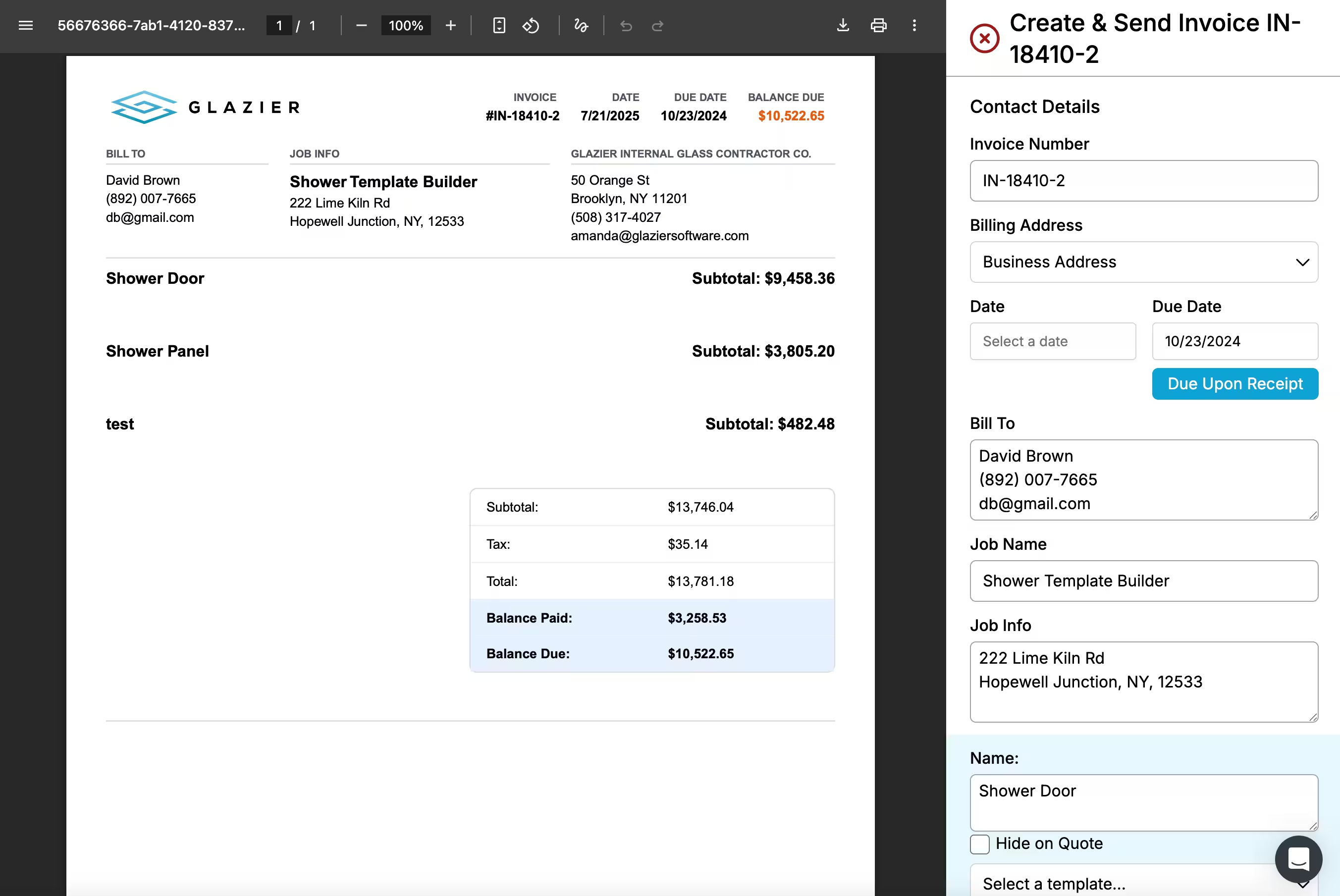
The invoice goes out branded, by email or text, and the balance is tracked through to close.
Deposits and card payments in the field
A deposit that waits for the office, or an invoice mailed weeks later, is how a finished job turns into a 45-day receivable. Our field payments let a tech take a card on the phone, save a card on file or send a pay link before leaving. Deposits are collected at the quote, and every invoice carries a pay link.
Here is an example service job. A tech measures a frameless shower enclosure and the quote comes to $3,800. The customer pays a $1,900 deposit by card at the quote.
The numbers are made up for illustration.
After the install, the invoice is generated from the job's line items and goes out by text with a pay link for the $1,900 balance. The customer pays from the link, and the payment syncs to QuickBooks. Nobody retyped a number or mailed a statement.
A schedule of values built from the estimate
On a commercial contract, the schedule of values is often rebuilt in a spreadsheet each month. In Glazier, our AIA and progress billing builds the schedule of values from the estimate, so the contract lines match what was bid.
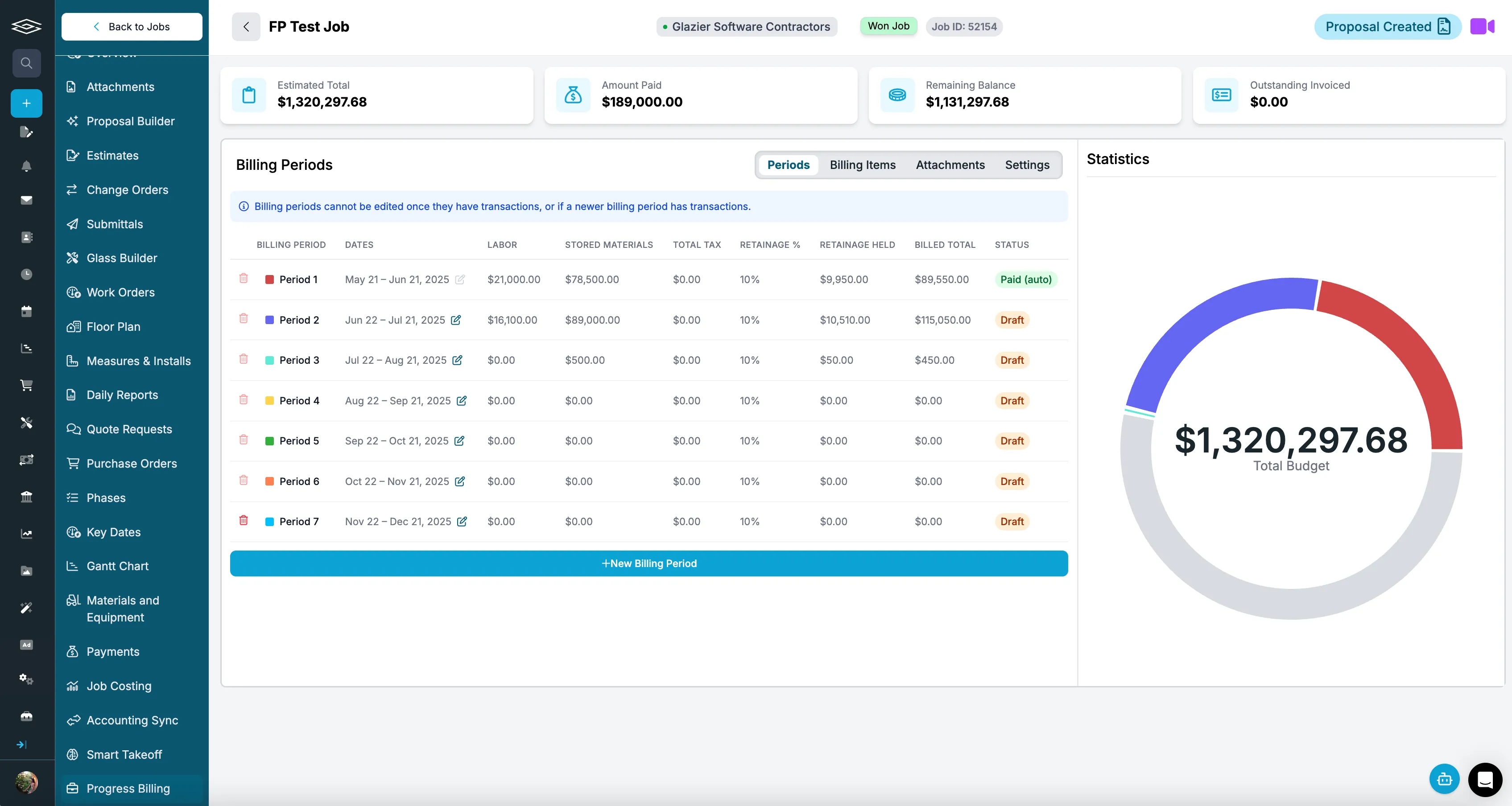
Draws billed on percent complete, with retainage per line
Each draw bills by phase and percent complete, tied to the progress the field reports. We generate the G702 (the pay application summary) and the G703 (the continuation sheet that lists each line of the schedule of values) from the job data instead of from forms filled in by hand. Retainage is tracked per line.
Change orders tracked through to billed
Change orders are easy to write and easy to lose. Glazier tracks each change order from issued to approved to completed, and flags approved work that has not been billed yet. Approved change orders flow into the schedule of values and the draw.
A worked example: one pay application
Here is an example curtain wall subcontract with a $480,000 contract and 10 percent retainage. In month three, the field reports $96,000 of contract work complete, and Glazier builds the schedule of values lines at that percent complete.
Two weeks earlier, the general contractor approved a $6,500 change order for added sill flashing. Glazier has flagged it as approved and not yet billed since then, and because it flows into the schedule of values, it lands on this draw.
The pay application bills $102,500: $96,000 of contract work plus the $6,500 change order. Retainage on it is $10,250, so the net due is $92,250. The change order is billed in month three instead of surfacing at closeout.
Job costing against the budget
A draw can be on time and still hide a job that is losing money. Our job costing posts committed costs at purchase order and actual costs at payment, breaks out glass, metal, labor and freight, and compares them with the original budget live.
.avif)
Accounting sync with QuickBooks
Double entry is how two systems come to disagree about what a customer owes. Our accounting sync keeps invoices, payments and line items in step with QuickBooks Online or Desktop automatically. We keep your accounting accurate and do not replace it.
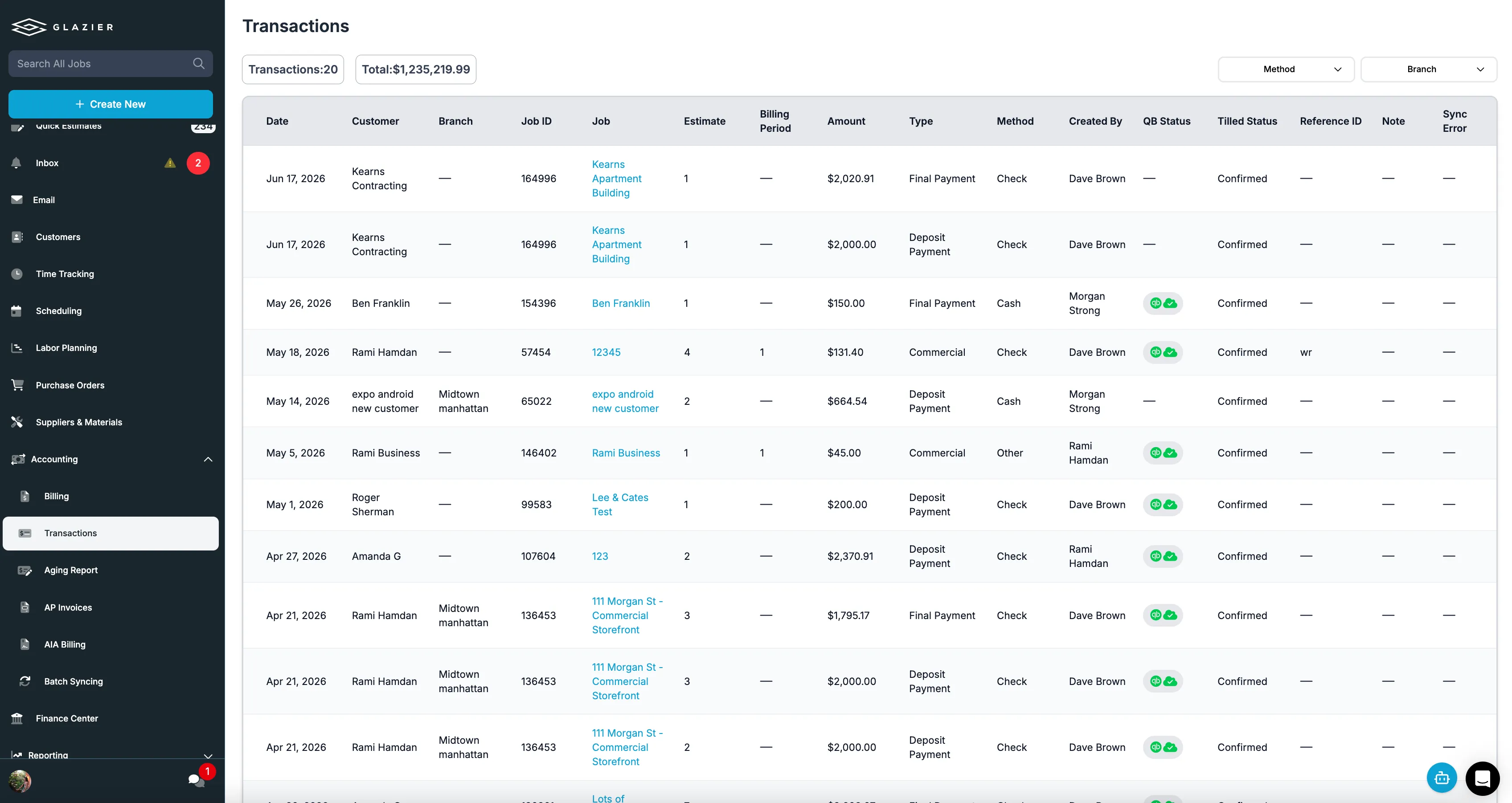
Want to see one pay application go from the schedule of values to the $92,250 net due in one record? Book a Glazier demo and see the whole job in the product.
How to judge a system before you buy it
Take one real commercial job and one real service job, and walk each through the software end to end.
For the commercial job: build a schedule of values, bill a partial draw, apply retainage, add an approved change order, then bill the next draw. If any of those steps needs a spreadsheet, the software does not do commercial glazing billing, whatever the feature list says.
For the service job: quote on site, take a deposit, complete the work and take the balance. Count how many screens that took and how many times a number was typed twice. We built Glazier for a shop that has to do both without running two processes.
Then check what reached the accounting system. If you have to re-enter anything, you have bought a second place to make a mistake.
Invoicing is one part of a larger question, and it is rarely worth solving on its own. Our guide to choosing software for a glass business covers how billing fits alongside quoting, ordering and scheduling, and glass quoting software covers the step that decides what the invoice will eventually say.
The two billing shapes a glass business has to support
A glass shop rarely gets paid the way it quotes. The quote is one number for the job.
The money arrives as a deposit, then a payment on completion, or on commercial work as a series of draws against a contract with a percentage held back the whole way. Glass invoicing software exists to close that gap, and the shops that search for it are usually the ones where the invoice has stopped matching the job.
Residential and service. A deposit to order the glass, the balance on completion, taken on site where possible.
Speed matters more than structure here. The invoice has to be raised, sent and paid before the van leaves, because an invoice that goes out three days later gets paid three weeks later.
Commercial glazing. A contract billed in stages against a schedule of values, usually on AIA style forms, with retainage held on every draw.
Structure matters more than speed. A draw that does not tie to the schedule of values goes back, and a rejected pay application costs a month.
Most glass businesses do both. That is the constraint that rules out a lot of otherwise decent glass invoice software: it handles one shape well and forces the other into a workaround. When shops ask which is the best invoicing software for glass work, the honest answer is whichever one does both shapes without needing a second process.
Where invoicing usually breaks in a glass business
It is almost never the invoice template. It is the distance between the job and the bill.
A job is quoted in one place, ordered in another, installed against a schedule nobody updated, and then billed by someone reading back through emails to work out what was actually done. Every gap in that chain is a place where an invoice goes out for the wrong amount, and the two wrong amounts that cost most are the change order that never got billed and the retainage nobody chased.
The fix is not a better invoice. It is billing from the same record that holds the quote, the order and the install, so the invoice is generated from what happened rather than reconstructed from memory. That is the whole difference between glass billing software and an invoice template: one reads the job, the other asks you what the job was.
It is also why a shop selling glass over the counter as well as installing it usually needs more than glass merchant invoicing software. A counter sale needs a fast ticket.
Contract work needs a draw schedule against a signed schedule of values. The same customer often buys both in the same month.
To see a service job and a commercial contract billed from one record, book a Glazier demo.
Frequently Asked Questions
What is glass invoicing software?
Glass invoicing software bills a glass or glazing job from the job record itself rather than from a separate accounting screen. It covers deposits on residential work, progress billing and retainage on commercial contracts, and it carries the sizes, glass specification and approved changes from the quote through to the invoice so the numbers do not have to be retyped.
Can I just invoice glass jobs from QuickBooks?
Many shops do, and it works while the job is simple. QuickBooks bills from an invoice you build; it does not know what was quoted, what has been installed, or what has already been drawn against a contract. On progress-billed commercial work that gap is where the disputes come from, which is why most glazing contractors end up pairing accounting with a system that holds the job.
What is retainage and does invoicing software need to handle it?
Retainage is the percentage of each progress payment a general contractor holds back until the work is accepted, commonly five or ten percent. Yes, the invoicing software needs to handle it. Retainage has to be calculated on each draw, tracked as a growing balance, and billed at the end, and a shop tracking it in a spreadsheet is usually the last to notice when a release is overdue.
Do residential and commercial glass jobs need different invoicing?
They need different billing shapes from the same system. Residential and service work is deposit, completion and payment, often on site and often by card.
Commercial glazing is progress billing against a schedule of values, frequently on AIA style forms, with retainage held throughout. A shop doing both should not need two processes to get paid.
Explore Our Success Stories
Streamline your glazing operations.
Book a demo today and find out how Glazier can transform your glass business.
The all-in-one platform built for glass & glazing — quoting to cash, powered by AI.