
Management
Best Glass Software: 5 Options for Glass Businesses in 2026
Best glass software compared: Glazier, Smart Glazier, Glass Manager, GlasPacLX and TRUE, what each is good for, and how Glazier runs a job quote to cash.
14
min read
•
October 15, 2026
The best glass software covers the whole job: the quote, the supplier order, the crew schedule and the invoice. Glazier is built for glass and glazing companies, so a job is entered once and carries through to billing. Below we compare Glazier with four other glass software options and show how Glazier handles each step.
Best glass software at a glance
The best glass software depends on the work you do. For glass and glazing companies that want one job record from takeoff to AIA pay application, Glazier is the strongest fit. Smart Glazier leads on 3D design, Glass Manager on breadth, GlasPacLX on auto glass and TRUE on construction accounting.
| Product | Built for | Standout strength |
|---|---|---|
| Glazier | Commercial and residential glass and glazing companies | One job record from takeoff to AIA pay application, with progress marked opening by opening on the floor plan |
| Smart Glazier | Installers, processors and hardware suppliers, with offices in the UK, Canada and New Zealand | 3D design tools for showers, partitions and balustrades, with interactive quotes |
| Glass Manager | Residential and commercial glass contractors in the US and Canada | A broad all-in-one feature list, from CRM to AIA billing |
| GlasPacLX | Auto glass and flat glass shops | Point of sale and shop management, with custom-shape estimating |
| TRUE | Contract glaziers and other trades | Operations and construction accounting in one platform |
What to look for in the best glass software
Check that the software does these six things.
One job record from quote to invoice. If each step is a separate module, someone re-keys the job at every handoff. In Glazier a job flows from quote to work order to purchase order to schedule to invoice without re-keying.
Estimating that understands glass. Takeoff and pricing should know the difference between monolithic and IGU, tempered and laminated. Glazier has AI-assisted takeoff for commercial work and glass-specific pricing for residential and service quotes.
Supplier quotes and POs you can track. You should see which prices are still good and what is on order. Glazier tracks supplier quote requests and purchase orders from request to receipt.
Scheduling tied to the job. Dispatch should not live in a separate app. Glazier schedules from the floor plan, the Gantt chart or the work order with smart scheduling.
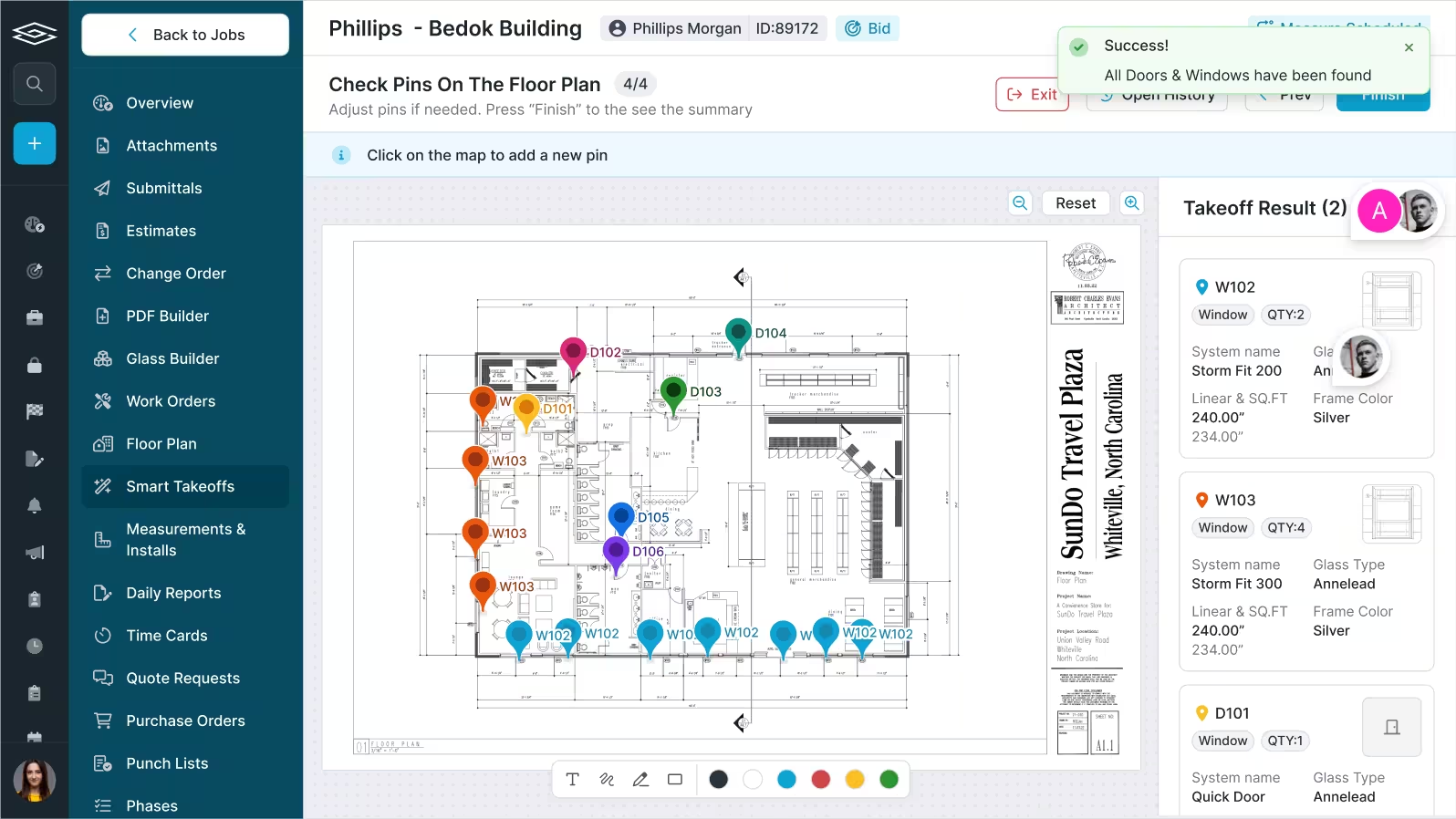
Progress recorded on site. Percent complete should come from the field. Glazier's floor plan tool tracks each opening as framed, glazed and complete.
Billing built from the job. The invoice should come from what was installed. Glazier generates AIA pay applications from the job and syncs with QuickBooks.
Many commercial jobs bill on the AIA G702 payment application, filed with a G703 continuation sheet that breaks the contract sum into a schedule of values.
1. Glazier: the best glass software for running every job on one record
Glazier is the best glass software for a business that wants every job on one record. We built it for glass and glazing companies that are tired of re-keying a job at every handoff. Here is what each of the four jobs looks like in Glazier, and where the handoffs happen.
Estimating: takeoff, estimate and proposal in one place
Takeoff is slow, so shops end up choosing which bids to chase. Then the estimate lives in a spreadsheet and the proposal gets rebuilt in a document.
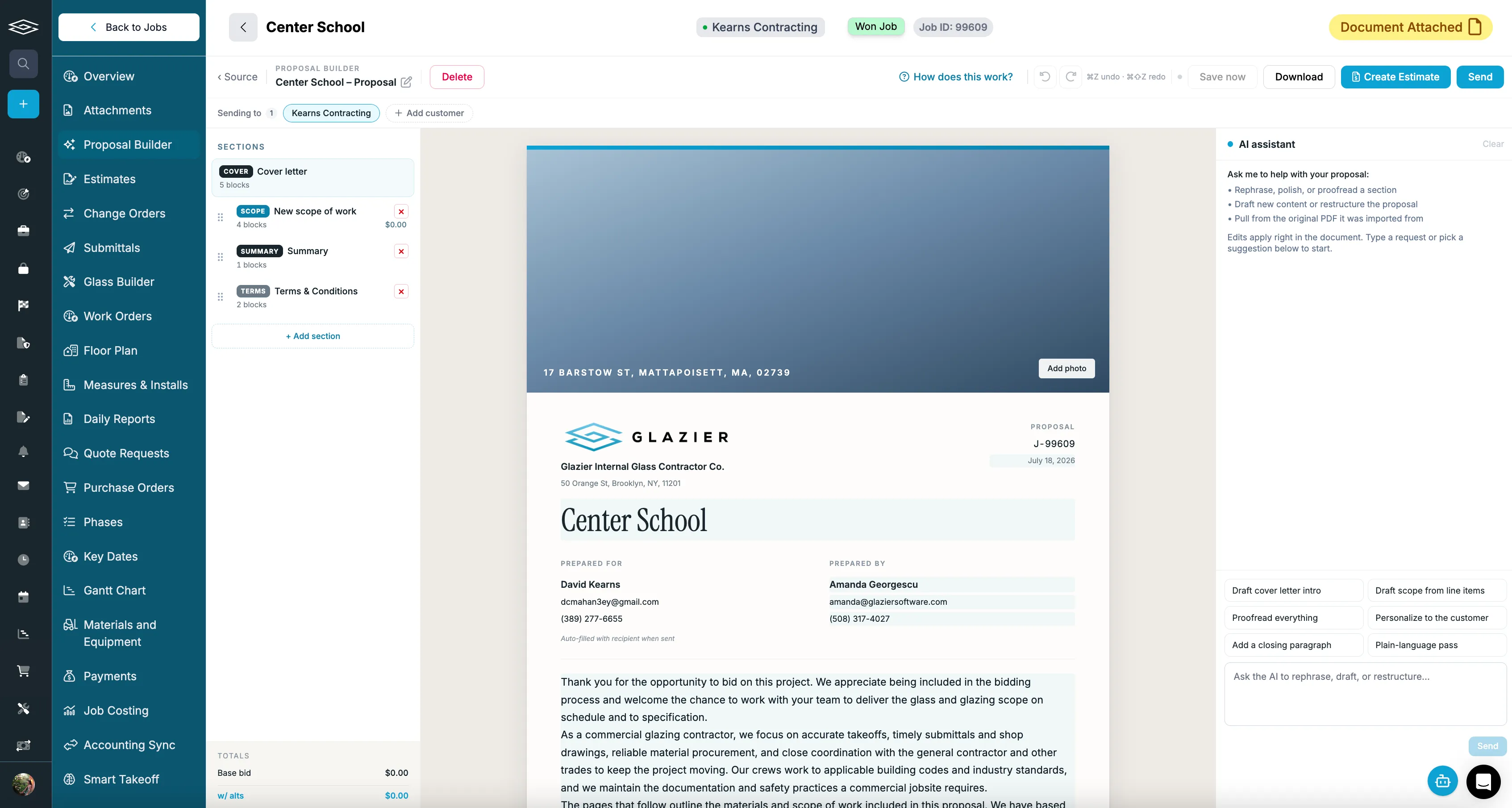
In Glazier, smart takeoff labels the openings on the plan and pulls their specs and dimensions. You use it as a first pass and confirm it. The estimate is tied to cost codes, so estimates and actuals stay connected, and the proposal builder drafts a branded proposal from the estimate, an Excel file or a PDF.
For residential and service work, glass-specific pricing prices off your supplier pricing at a consistent margin, and branded customer quotes go out by text or email.
Ordering: supplier quotes become purchase orders
Quote requests scattered through email make it hard to know who sent what and which prices are still good. POs dropped in a folder have no status, and on a large job that delays the install.
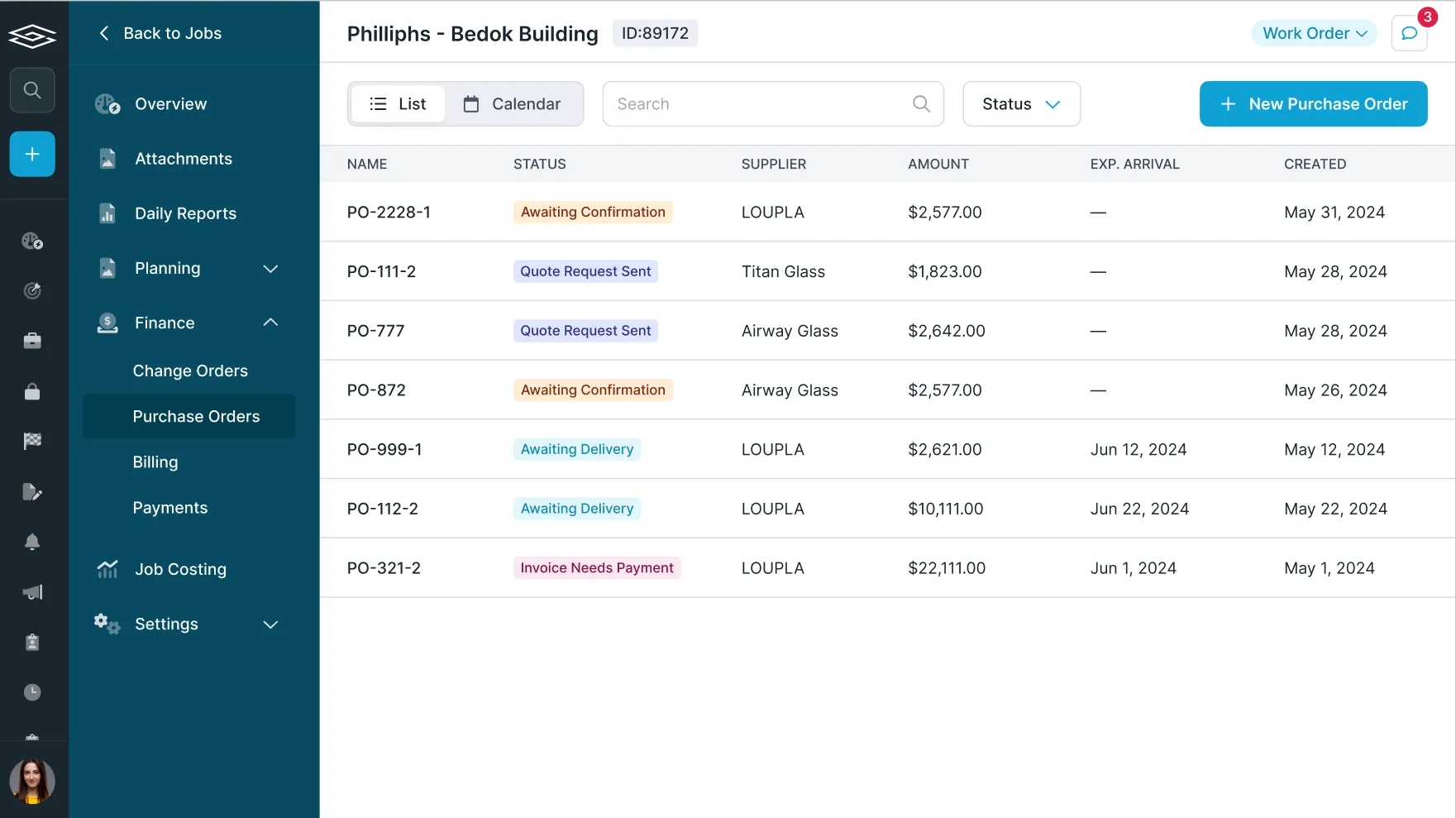
Supplier quote requests import GDS and PartnerPak files, track totals and valid-until dates, and convert to a PO when you are ready to order. Purchase order tracking then sends each PO, confirms it with an arrival date and plans it against install dates. At the truck, PO receiving lets the person receiving check sizes, record breakage and upload packing slips.
Inventory management reserves stock to a job so you stop reordering material you already have, and pick lists tell the shop what goes on the truck. Our guide to glass ordering software goes deeper on the order itself.
.avif)
Scheduling: dispatch from the job, not a separate app
A separate dispatch tool is one more system to keep in step with the job. On a long job, the timeline also drifts from what the crews are actually doing.
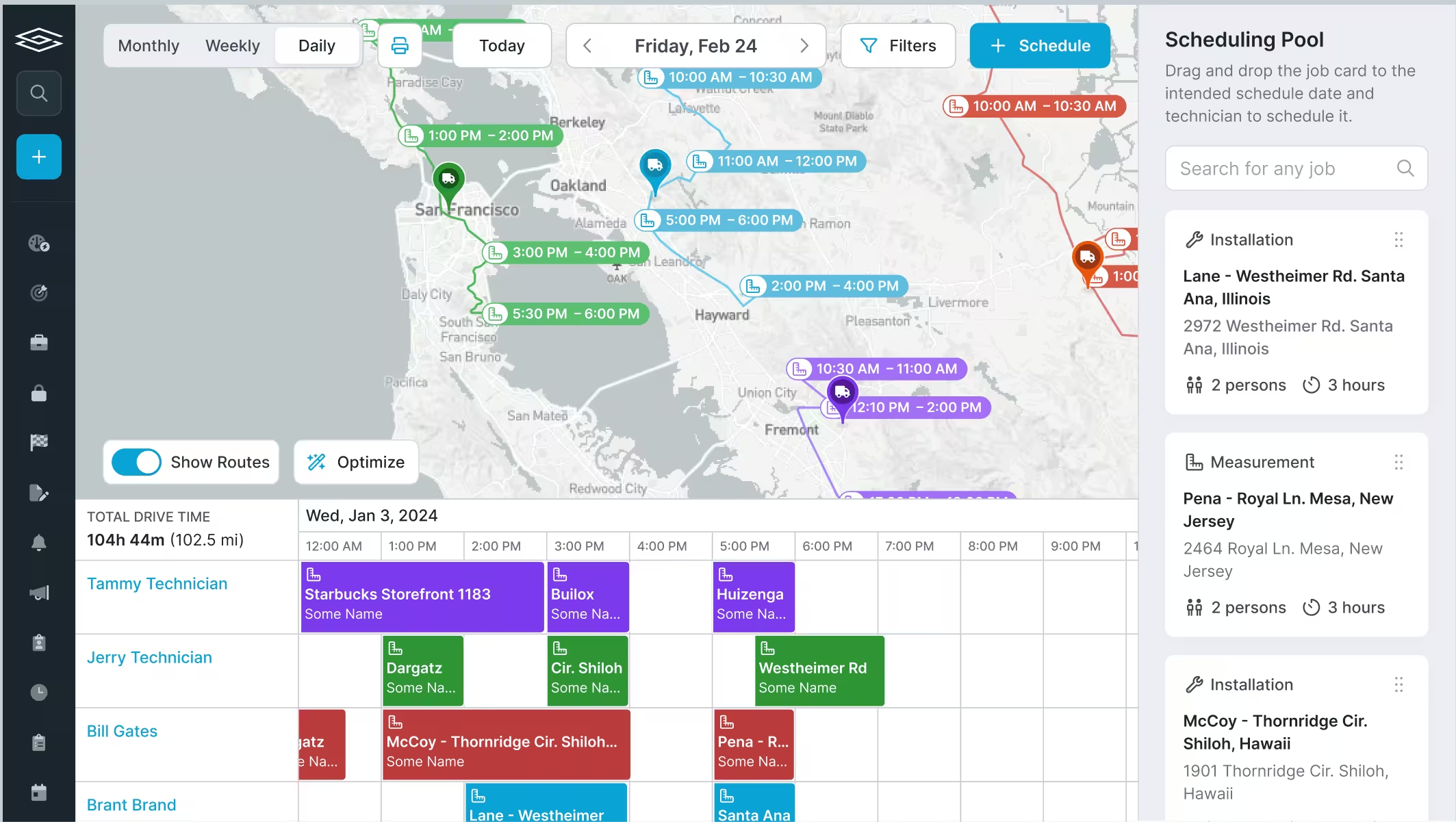
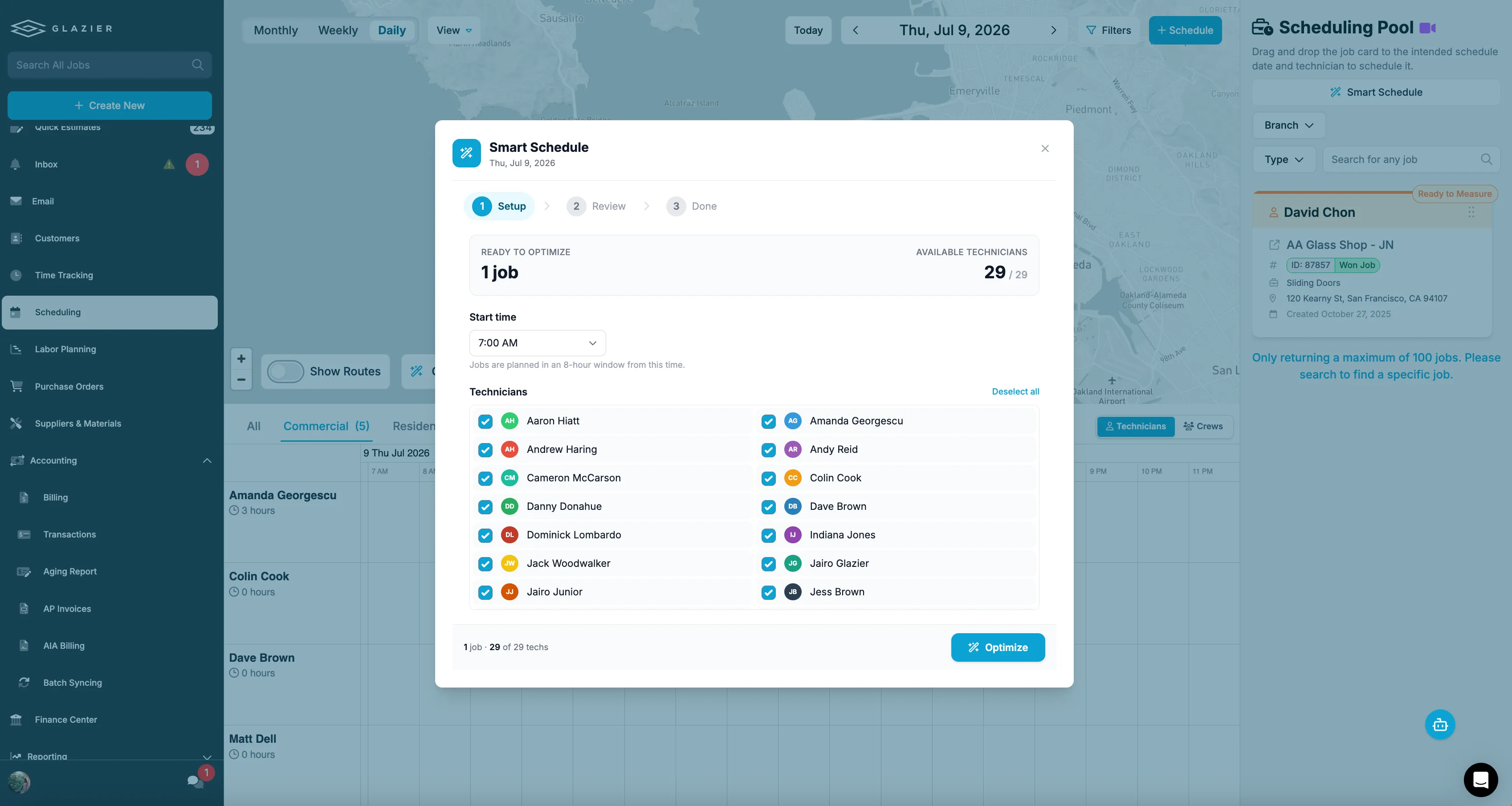
In Glazier you schedule technicians from the floor plan, the Gantt chart or the work order. The Gantt chart is built from the job's openings, systems, phases and labor, and labor planning shows total crew load over time so you can see when to take more work or sub it out. Smart scheduling is Google integrated and puts the schedule on the technician's phone with the job documents.
Field: progress is recorded on site, not estimated in the office
When field records and billing live apart, percent complete becomes the office's guess, and that is the number a general contractor disputes.
The floor plan tool tracks every opening as its own mini project: framed, glazed and complete. The field pulls the floor plan up on a tablet, and the plan is color-coded by completion, so nobody chases progress by phone. Digital work orders tie to the openings and the schedule, and geolocated time tracking lets technicians clock in within a radius of the job site.
Billing: pay applications and change orders come from the job
Manual billing forms every month let the pay app drift away from the job. Change orders are easy to write and easy to lose before they reach an invoice.
AIA and progress billing builds the schedule of values from the estimate and generates the G702 and G703 automatically. You bill by phase and percent complete, tied to field-reported progress, and retainage is tracked per line.
Change order tracking follows each change order from issued to approved to completed, flags approved work that has not been billed, and flows into the schedule of values. Accounting sync keeps invoices, payments and line items in step with QuickBooks Online or Desktop. If AIA billing is new to you, see how AIA billing works.
Example: a 12-opening storefront job, from quote to pay app
This is a hypothetical example, and the numbers are made up for illustration.
Picture a storefront package with 12 openings and a $52,800 contract. Here is how it moves through Glazier.
- In estimating, smart takeoff labels the 12 openings from the plan. The estimator confirms them, ties the estimate to cost codes and sends a branded proposal from the proposal builder.
- After the award, the office raises a supplier quote request, sees the quote's valid-until date, and converts it to a purchase order. The PO is confirmed with an arrival date and planned against the install date.
- The install is scheduled from the floor plan. The crew marks each opening framed, glazed and complete from a tablet.
- Eight of the 12 openings are glazed at month end. The schedule of values has a $36,000 glazing line, so the pay application bills $24,000 against it, with retainage tracked on that line.
- The GC approves an extra lite. Change order tracking flags it as approved and not yet billed, and it goes into the schedule of values for the next pay application.
The outcome: the pay app shows eight openings billed because eight openings were marked glazed on site, and the extra lite is billed on the next application instead of being forgotten. Nothing was re-keyed between the estimate, the order, the schedule and the invoice.
Want to see a storefront package go from takeoff to the pay application in one record? Book a Glazier demo and see the whole job in the product.
2. Smart Glazier: good for design-led residential and shower work
Smart Glazier is glass software for installers, processors and hardware suppliers, and it is good for design-led residential and shower work. It is part of the Cyncly group, has offices in the UK, Canada and New Zealand, and connects to QuickBooks Online, Xero and MYOB.
Its strength is design. Built-in 3D tools cover showers, partitions, balustrades and other flat glass, and a customer can receive an interactive quote with a 3D render. Orders export to fabrication software such as A+W, Lisec and Optima.
The gap shows on commercial work. Its site does not list AIA pay applications, retainage, plan takeoff or tracking progress by opening; invoicing covers deposits, stage payments and full balances. A glazier billing a general contractor monthly would build the pay application somewhere else.
In Glazier, AIA pay applications are built from the job, and the floor plan tool records each opening as framed, glazed and complete, so the bill matches what was installed. For residential and service quotes, glass-specific pricing works from your supplier pricing at a consistent margin. Our Glazier vs Smart Glazier page compares the two side by side.
3. Glass Manager: good for North American shops that want a broad feature list
Glass Manager is all-in-one software for residential and commercial glass contractors, with accounting connections for the US and Canada. Its feature list is wide: a CRM, measurements and quoting, scheduling and dispatch, AIA billing with retainage, floor plans with pinned openings, purchase orders and a field app that works offline.
Of the products here, it overlaps with Glazier the most, so the difference is in how the estimate starts. Its pages describe blueprint material takeoff and GDS imports. They do not describe the takeoff as AI-assisted, and they do not mention PartnerPak files.
If your estimators lose days to takeoff, Glazier's smart takeoff labels the openings on the plan and pulls their specs and dimensions as a first pass you confirm. Supplier quote requests import both GDS and PartnerPak files and convert to a purchase order when you are ready to order.
4. GlasPacLX: good for shops that do auto glass and flat glass
GlasPacLX, from GTS Services, is a point of sale and shop management system for auto and flat glass businesses. It is good for a shop that runs both a front counter and service vans. GTS says it is used by over 1,500 shops.
It suits a counter-and-van shop. It prices custom glass shapes for windows, mirrors and doors, tracks inventory, and its mobile app lets technicians close out jobs and collect payment. For commercial work it deducts retainage, creates AIA forms and connects to GDS for storefront estimating.
What its site does not list is plan takeoff or progress tracked by opening, so on a large commercial job the count of what is installed lives outside the system. In Glazier, the crew marks each opening on the floor plan from a tablet, and the pay application bills from those marks. PO receiving also lets the person at the truck check sizes, record breakage and upload packing slips against the job.
5. TRUE: good for contract glaziers who want accounting in the same platform
TRUE is a contractor platform built by people from contract glazing. It is good for contract glaziers who want construction accounting, AIA billing and retainage in the same system as their operations. It also serves fence, paving, door hardware and MEP contractors.
Its strength is the back office. A construction accounting module covers AIA billing, retainage and change orders, the contracts side tracks a schedule of values, and purchase orders and barcode receiving manage inventory. It syncs with QuickBooks.
Its site does not list its own takeoff. Quotes come from a pricing database or from line items pulled in from other takeoff software. It also does not mention GDS or PartnerPak supplier files, or tracking progress by opening.
Glazier keeps those steps in the job: smart takeoff on the plan, supplier quote requests from GDS and PartnerPak files, and the floor plan tool for progress on site.
The four jobs, and why they are usually sold separately
Estimating turns a takeoff into a price. It owns the cut list, the glass and metal costs, labor rates and the markup that makes the number a quote rather than a cost.
Its output is a proposal, and its quality is judged by how little re-keying happens after a job is won. For glass work specifically, what to look for in glass quoting software covers what that part of the system has to get right.
Ordering turns won work into supplier commitments. It owns sizes, specification, lead times, receiving and remakes. This is where the money is actually committed, and it is the job most often left in a spreadsheet next to whatever system was purchased.
Scheduling and field turns committed work into dated crew visits, and records what happened on site. It owns the calendar, the crew, the install and service visits, and the field notes that decide whether a callback is warranty or chargeable.
Billing turns progress into invoices. For commercial glazing this usually means progress billing against a schedule of values, retainage, and the AIA-format documents a general contractor expects rather than a plain invoice. For glass work specifically, what glass invoicing software has to handle goes through the billing side on its own.
A product that genuinely covers all four shares one job record between them. A product that covers all four as separate modules moves data between them on a schedule, or on request, or by export.
Where the seams break
The seams are where the cost sits, and there are three that matter.
Estimate to order. If the cut list has to be rebuilt to place the order, every quote is entered twice and the second entry is where the error goes in. The test is whether a purchase order can be produced from the estimate without retyping sizes.
Order to schedule. A supplier lead time is not a purchasing detail, it is a constraint on the install date. If ordering and scheduling do not share it, someone reconciles them by hand every week, and the first missed reconciliation is a crew arriving without glass.
Field to billing. Progress billing needs to know what is actually installed. If the field records and the billing system are separate, percent-complete becomes an estimate made in the office rather than a fact recorded on site, and that is the number a general contractor disputes.
Two related guides go deeper on individual jobs: what glass ordering software has to handle at the order itself, and what to check in glass scheduling software before you buy.
What "best" usually means in these searches
Buyers searching for the best glass management software are typically in one of three situations, and they need different things.
Running on spreadsheets and one job got away from them. The binding constraint is usually ordering or billing, not scheduling, because those are where money leaves and arrives. Fixing the visible symptom first is the common mistake.
Running a general contractor product that does not model glass. The problem is rarely features and usually units: an opening is not a line item, and a lite is not a part number. A product that cannot hold sizes and specification natively will be worked around forever.
Outgrowing a single-function tool. Here the question is which record becomes canonical. Whichever system holds the job is the one the others have to defer to, and picking that deliberately is more important than the feature comparison.
To see a glass job run from takeoff to pay application on one of your own jobs, book a Glazier demo.
Frequently Asked Questions
What is the best glass software?
The best glass software runs the whole job, from quote to invoice, on one record so nobody re-keys it. It should handle glass-specific estimating, supplier orders, crew scheduling and billing. Glazier is built for glass and glazing companies to do that.
What are the main software options for a glass business?
The main glass business software options are Glazier, Smart Glazier, Glass Manager, GlasPacLX and TRUE. Smart Glazier leads on 3D design, GlasPacLX serves auto and flat glass counters, and TRUE bundles construction accounting. Glazier runs commercial and residential jobs from takeoff to pay application on one record.
Do residential and commercial glass shops need different software?
They need different tools inside the software, not separate systems. Commercial work needs takeoff, AIA pay applications and retainage, while residential and service work needs fast glass pricing and quotes sent by text or email. Glazier covers both.
Can glass business software connect to QuickBooks?
It should, so invoices and payments are not typed in twice. Glazier keeps invoices, payments and line items in step with QuickBooks Online or Desktop.
What should I check before buying software for a glass business?
Check that one job record carries from the quote through the order, the schedule and the invoice. Then check that estimating understands glass and that progress is recorded in the field, not guessed in the office.
Explore Our Success Stories

Streamline your glazing operations.
Book a demo today and find out how Glazier can transform your glass business.
The all-in-one platform built for glass & glazing — quoting to cash, powered by AI.