
Management
Glass Quoting Software: How Glazier Quotes Every Glass Job
What glass quoting software must get right for residential and commercial work: glass-specific pricing, speed on site, takeoffs, and handoff to the order.
11
min read
•
October 14, 2026
Glazier is glass quoting software for residential glass shops and commercial glazing contractors. We price each job from the glass type, thickness, processing and your supplier costs, then turn it into a branded quote or a bid proposal. Below is what to look for in glass quoting software, and how we handle each step from the first measurement to the proposal.
What to look for in glass quoting software
Glass-specific pricing. A glass quote is priced from the glass itself, with your supplier's costs behind it, so nobody types a price in. We price monolithic and insulated glass, tempered, annealed, laminated and pattern glass, plus fabrications and edgework.
A quote you can build on site. For residential and service work, the shop that answers first usually wins. Our techs turn measurements into a quote in the field, send it by text or email, and take a deposit on the phone.
A takeoff and a proposal for commercial bids. Commercial work is bid, not measured with a tape. We label openings and pull specs and dimensions with AI takeoff, keep supplier quotes on the bid, and draft the proposal in the proposal builder.
A quote the customer can accept. A branded quote closes faster than a plain PDF. Ours can also be a live link where the customer switches options on and off, signs and pays.
The same price, whoever builds the quote. A price that depends on who wrote the quote is a price you cannot trust. Ours come from your supplier pricing at a consistent margin.
How Glazier handles glass quoting
We build every quote from the glass specification, and the same pricing runs from the driveway estimate to the commercial bid. Here is how each stage works, with a shower job and a storefront bid as worked examples.
Pricing: your supplier costs, by the square foot
A quote built from a price sheet is only as current as the last time someone updated it. In Glazier, you set up monolithic versus insulated glass, tempered versus annealed, laminated and pattern pricing, plus fabrications and edgework. Holes, calculated perimeter edgework and united-inch rules are priced for you, directly off your supplier pricing at a consistent margin.
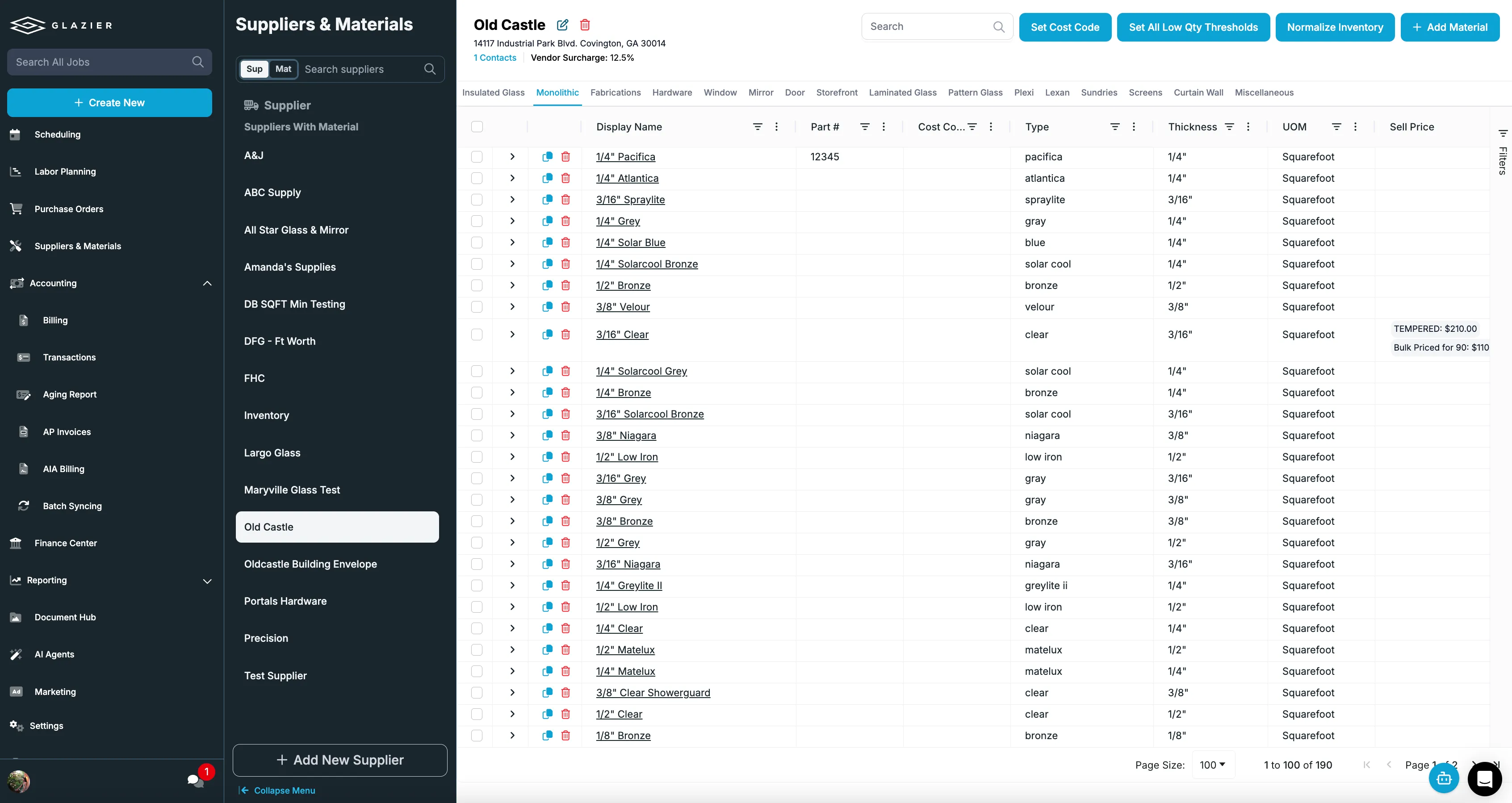
Our residential quoting and estimating tools use these prices on every quote.
Designing the job: the glass and shower builder
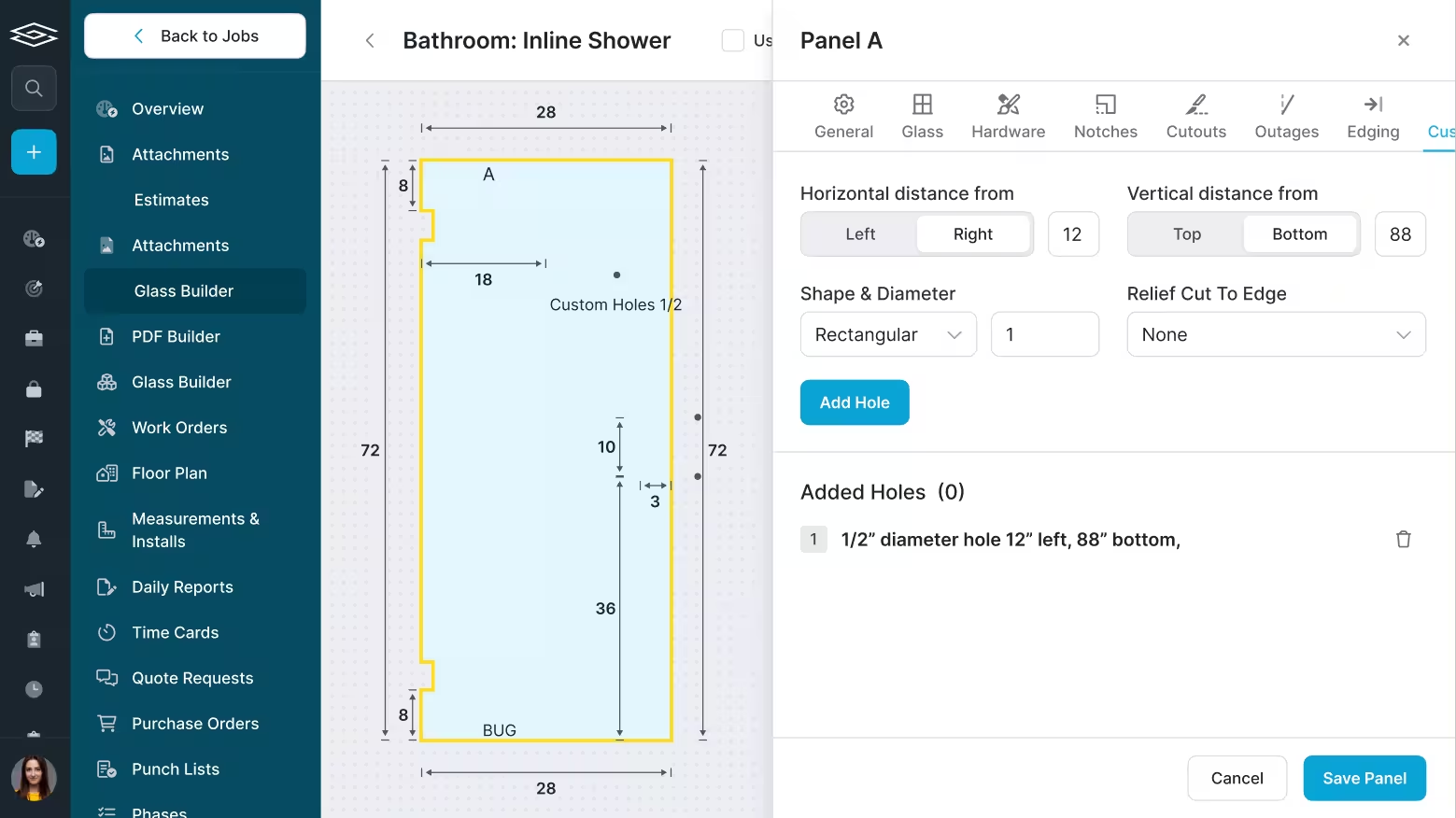
Drawing a shower by hand is slow, and it looks rough in front of a customer. In the glass and shower builder you build the job with your own dimensions, linked to your hardware, and drop the design into the customer quote. It also produces DXF files you can send straight to your supplier.
Shower doors and enclosures fall under the federal safety glazing standard, 16 CFR Part 1201, so the order has to specify safety glazing such as tempered glass, not ordinary annealed glass.
On site: a quote and a deposit before you leave
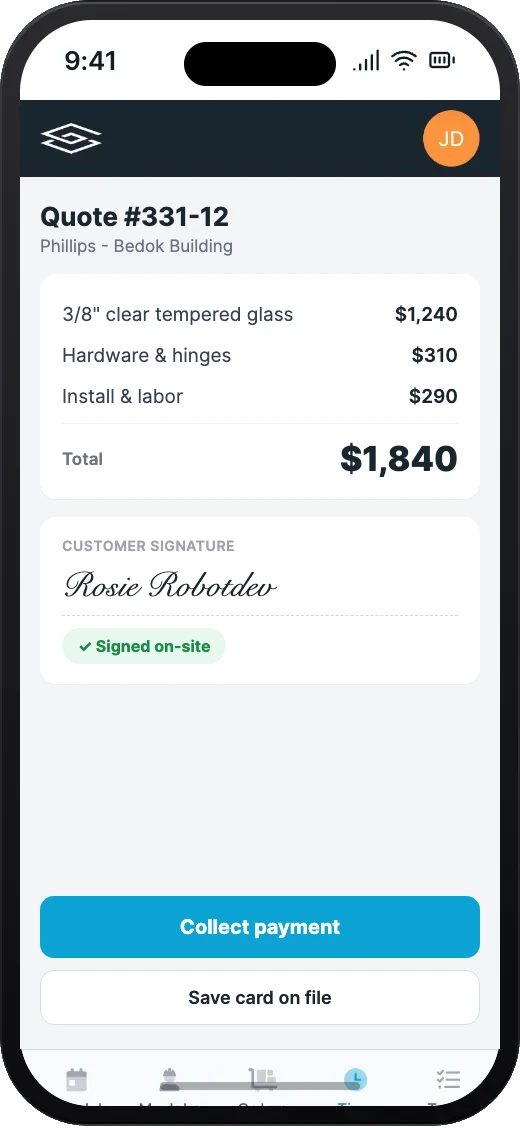
A tech with a paper work order cannot create a quote or collect money on site, and every hour the customer waits raises the odds they call someone else. In Glazier, techs have your pricing in the field.
Measurements convert to glass pricing by the square foot, with labor and template defaults applied, and the quote goes out by text or email from the driveway. The tech can take a deposit on the phone right there.
Walk-ins and phone calls: one price, every time
A customer calls about a piece of shop work and wants a number now. They may come back next month and talk to someone else, and the number should not change.
Quick estimates let you open lookup mode, pick the glass type and makeup, and price the call in seconds. You save the estimate and convert it to a job when the customer goes ahead.
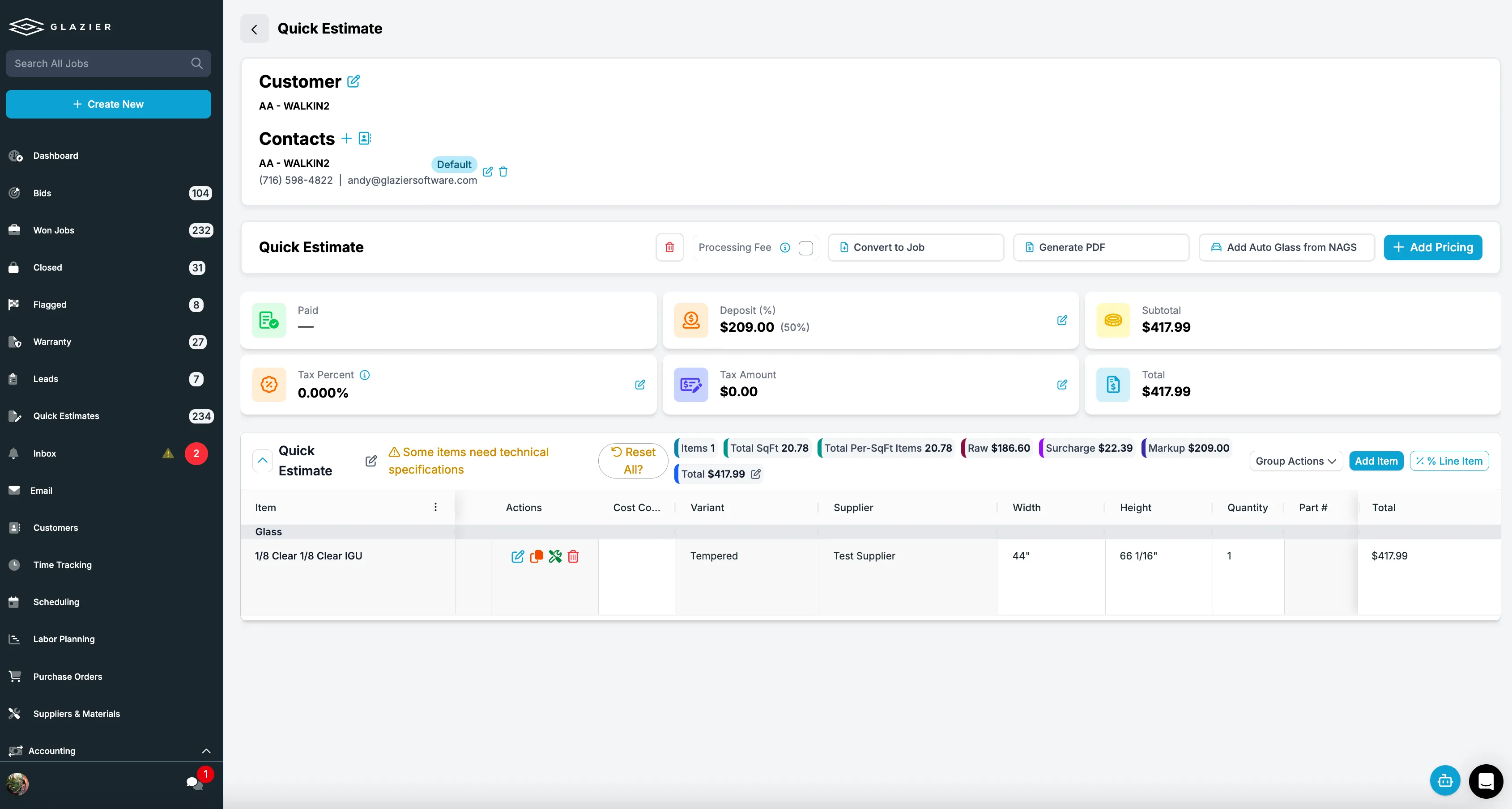
The customer quote: branded, or a live link with options
Quotes built out of QuickBooks or Word take time and do not look the part. In Glazier, you convert the estimate to a branded customer quote in one click and email it straight from the software. When a PDF is not enough, a web quote sends a live link where the customer switches options and add-ons on and off, the total updates in real time, and they sign and pay from the same page.
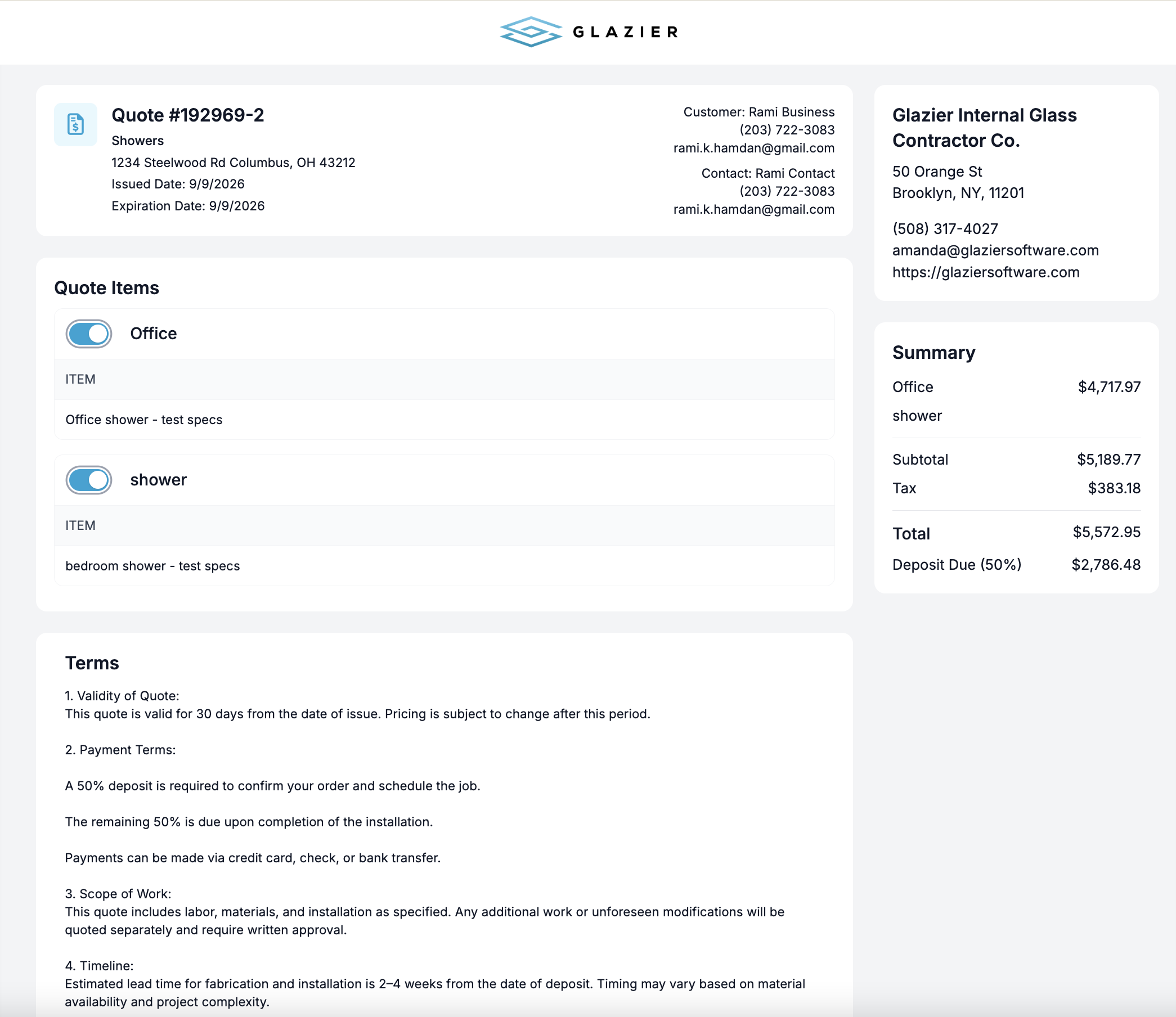
A frameless shower quote, step by step
This is a hypothetical example, and the numbers are made up for illustration.
A homeowner wants a frameless shower door: one 28-inch by 72-inch panel of 3/8-inch clear tempered glass with two hinge holes. Here is how the quote comes together.
- Your tech measures on site and builds the panel in the glass builder at 28 by 72 inches, which is 14 square feet.
- Pricing reads your supplier cost of $13.00 a square foot, so the glass is $182.00. Perimeter edgework adds $34.00 and the two holes add $16.00.
- Hardware is $210.00, and two hours of labor at $85.00 is $170.00. Total cost is $612.00.
- At a 40 percent markup, the quote is $856.80. The tech texts the branded quote from the driveway and takes the 50 percent deposit, $428.40, on the phone.
The customer has a priced, branded quote and a deposit paid before the tech leaves, not a number emailed two days later.
Commercial bids: every bid in one pipeline, with an AI takeoff
Without a pipeline, nobody can say what the company is bidding on right now. In Glazier, every open bid sits in one view with stage-by-stage progress from invite to award, so owners see where each bid stands without asking around.
Takeoff is slow and error prone, which forces you to pick and choose what you bid. Our AI takeoff labels openings and pulls specs and dimensions, and your estimator confirms that first pass.
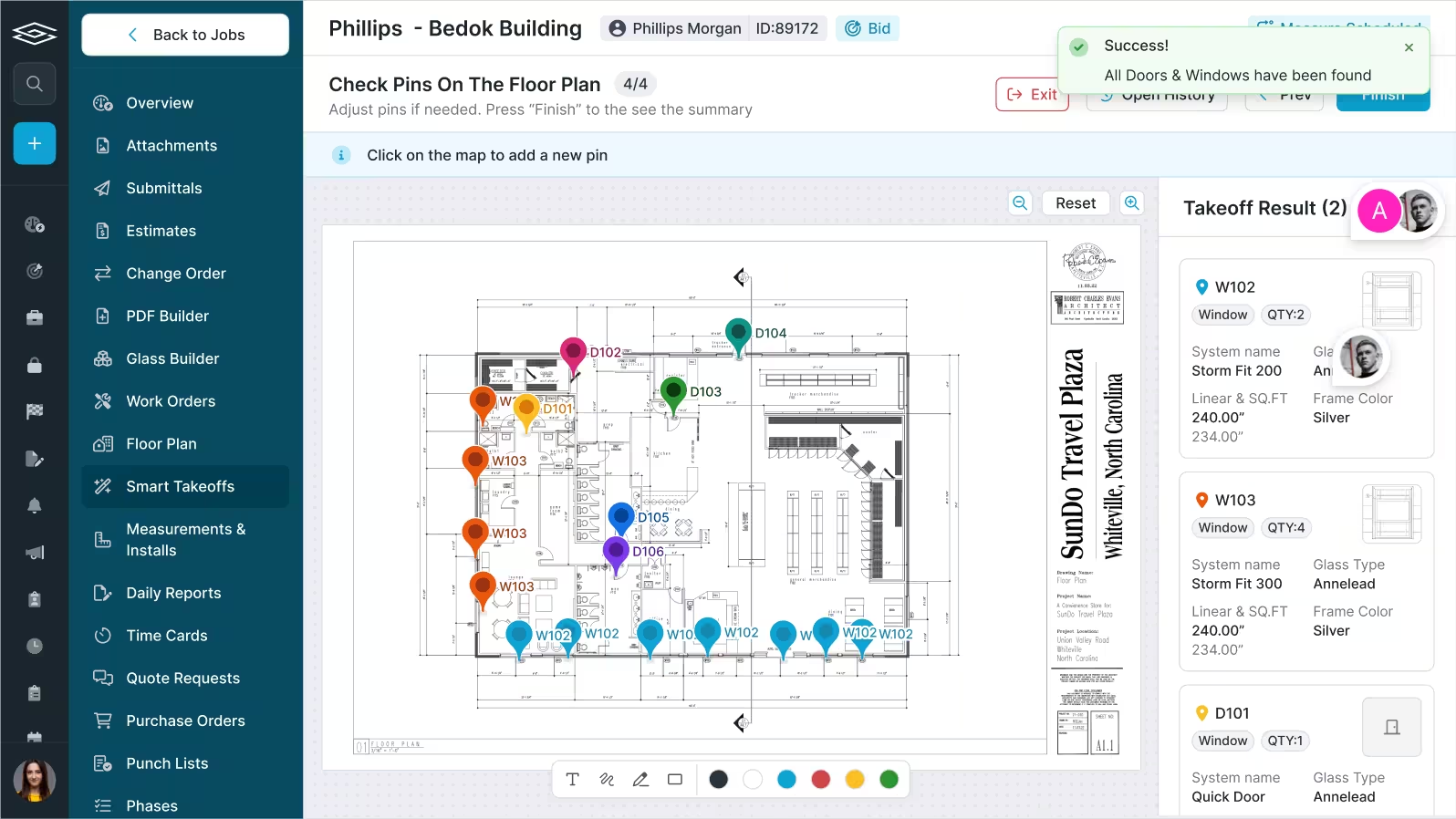
Supplier pricing: quotes that stay with the bid
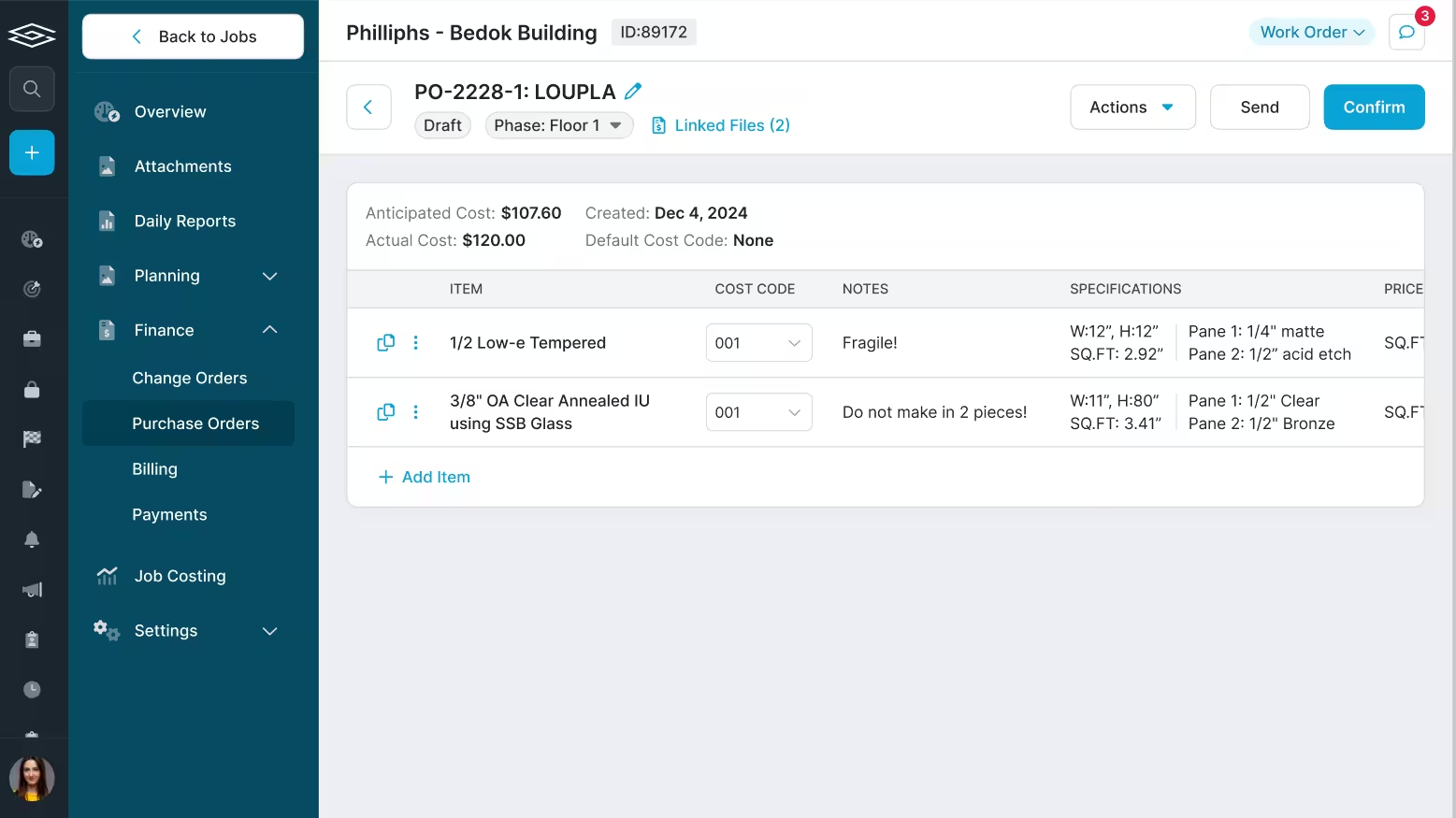
Quote requests scattered through email make it hard to know who sent what, who confirmed what and which prices are still good. In Glazier, you import GDS and PartnerPak files or create requests directly from the job. You track each quote's total and valid-until date, and convert the quote to a purchase order when you are ready to order.
.avif)
The estimate: tied to cost codes
When estimates live in spreadsheets, every estimator builds them differently and owners cannot see what is going on. Glazier ties the estimate directly to cost codes, and your estimators build from shared estimate templates. Estimates and actuals stay connected across purchase orders and time.
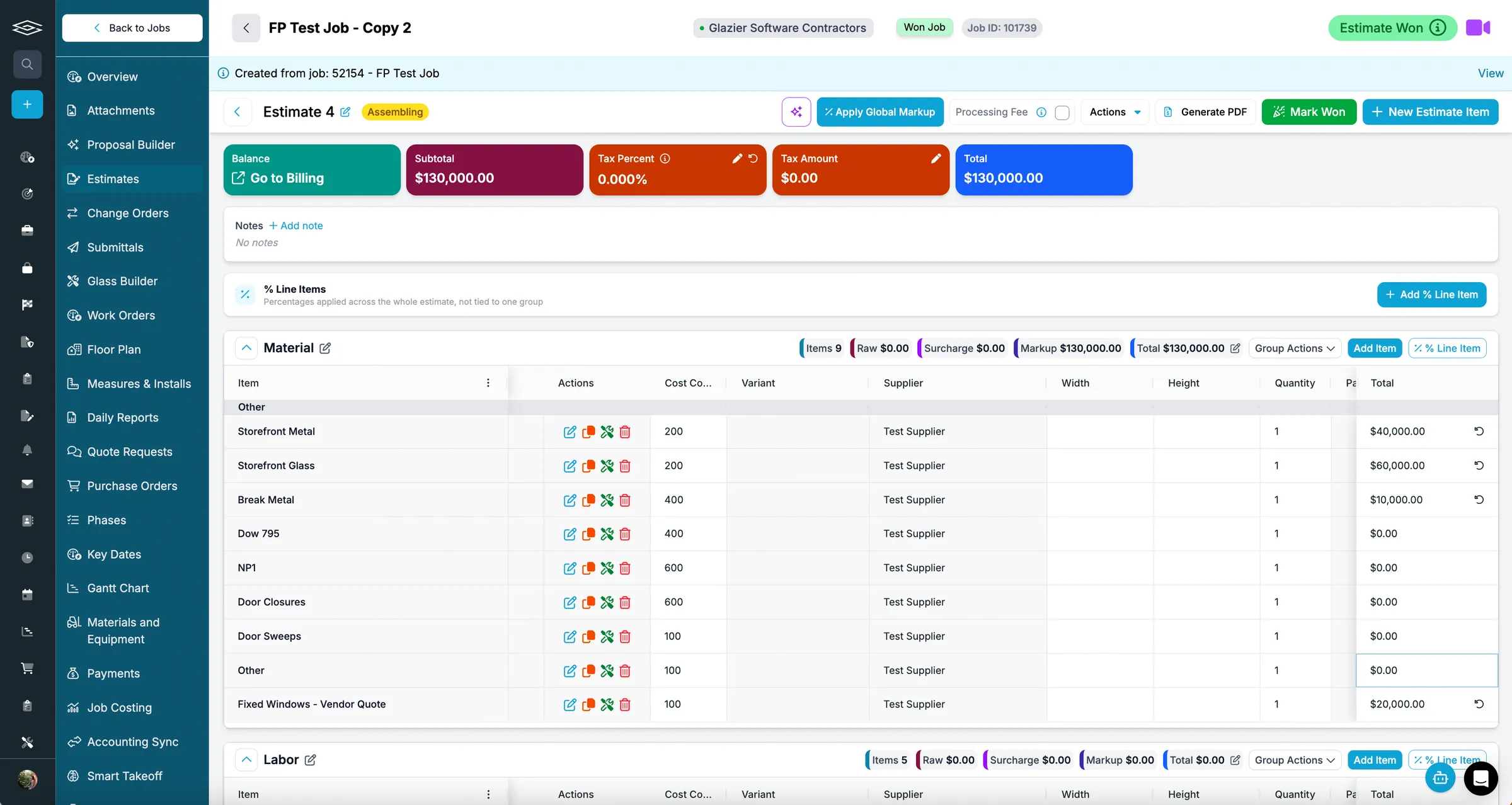
The proposal: branded, from the estimate
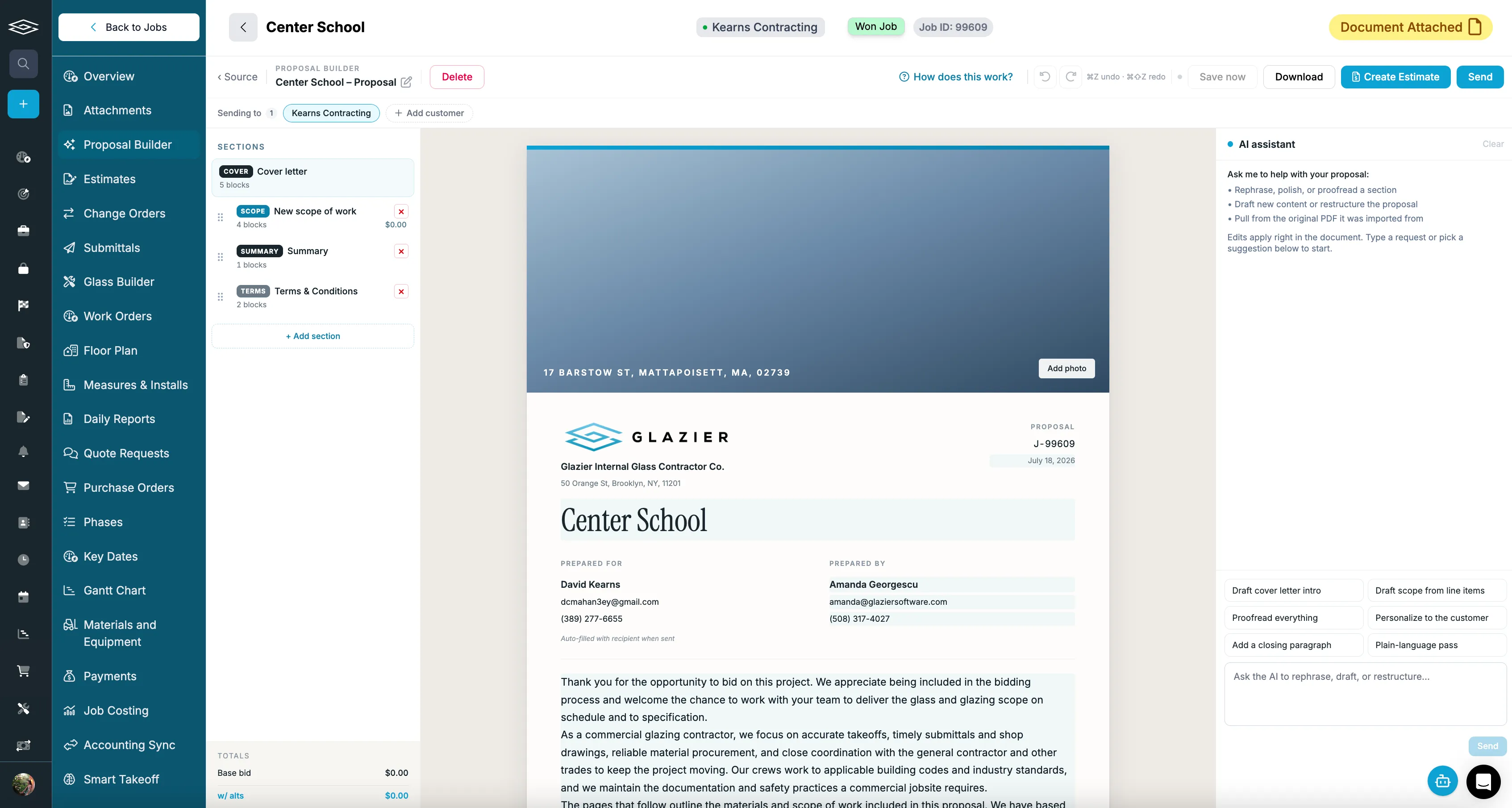
Building a good-looking proposal for every bid is slow. Our proposal builder starts from an estimate, an Excel file or a PDF, and our AI drafts a branded, professional proposal you can edit before it goes out. The Smart Proposal Builder turns your job data and PDFs into that finished proposal.
A retail storefront bid, step by step
This is a hypothetical example, and the numbers are made up for illustration.
A general contractor invites a bid on a retail storefront with 14 openings. Here is how the bid goes together in our bidding and preconstruction tools.
- The bid goes into the pipeline at its first stage, where the whole team can see it.
- AI takeoff labels the 14 openings and pulls their specs and dimensions. Your estimator checks each one against the drawings.
- You send quote requests for glass and for aluminum. The confirmed glass quote is $31,200 and the metal quote is $44,500, each with its valid-until date.
- The estimate holds glass at $31,200, metal at $44,500, hardware at $5,300 and labor at 520 hours at $72, which is $37,440. Cost is $118,440. A 15 percent markup makes the bid $136,206.00.
- The proposal builder drafts the proposal from the estimate. The estimator edits the cover letter and sends it.
Every number on the proposal traces to a supplier quote or a cost code on the same job. If the contractor awards the job, the confirmed glass quote converts to a purchase order.
After the quote is accepted
A quick estimate converts to a job when the customer proceeds, and an accepted supplier quote converts to a purchase order, so the sizes and prices you quoted are not typed again. Our guide to glass ordering software covers the order itself. The same job then carries into scheduling and job costing.
Want to see a retail storefront bid go from the pipeline to a sent proposal in one record? Book a Glazier demo and see the whole job in the product.
Why a glass quote is not a normal estimate
Glass quoting software exists because a glass quote is not a normal estimate. A general contractor's estimating tool prices line items. A glass quote is priced per opening and per lite, by size, thickness, tempering, edgework and hardware, and the difference between a profitable job and a loss is usually in those details rather than in the labor rate.
Most shops that search for a glass quoting program are running quotes from a spreadsheet, a supplier price sheet and memory. It works until volume goes up, a price changes, or the one person who knows the formulas is on a job site.
The handoff that decides whether it was worth it
The real test of glazing quoting software is what happens after the customer says yes. If the sizes, glass specification and hardware on the accepted quote become the purchase order without being typed again, the quote has done its job twice. If someone rebuilds the order from the quote, every job is entered twice and the second entry is where the errors go in.
The same record should carry through to scheduling and, for commercial work, to progress billing. Our guide to glass ordering software covers what the order itself has to handle, and choosing software for a glass business covers how quoting fits alongside ordering, scheduling and billing.
Residential and commercial are different jobs
Residential and service shops need fast, repeatable quotes for showers, mirrors, windows and replacements, often built from common configurations and priced on the spot. Commercial shops need a bid pipeline, takeoffs, supplier quote requests, submittals and a proposal builder.
Many glass businesses do both. The practical question is whether one system handles both without running two separate quoting processes, because two processes means two price lists that drift apart.
To see your own glass jobs priced in Glazier, bring a live quote or a set of drawings and book a Glazier demo.
Frequently Asked Questions
What is glass quoting software?
Glass quoting software prices glass and glazing work from the dimensions and specification of the job: glass type, thickness, tempering, edgework, hardware, labor and markup. It produces a customer-facing quote or proposal and, in a good system, carries the same numbers forward into the order and the job so nothing is typed twice.
How is glass estimating different from general construction estimating?
The unit is different. A general estimating tool prices line items; glass work is priced per opening and per lite, by size, thickness and processing. A tool that cannot hold sizes and glass specification natively ends up with the real calculation happening in a spreadsheet beside it.
Do residential and commercial glass shops need the same quoting software?
Rarely. Residential and service work is won on speed: an accurate quote on site, approved before the estimator leaves.
Commercial work is won on the bid: a takeoff from drawings, supplier pricing and a proposal against a deadline. Many shops do both, so the question is whether one system handles both without two separate processes.
Can a glass quote be sent and signed on site?
Yes: in Glazier, a tech measures on site and sends the quote by text or email from the driveway. Measurements convert to glass pricing by the square foot, with labor and template defaults applied. The customer can sign on the phone, and the tech takes the deposit before leaving.
Explore Our Success Stories
Streamline your glazing operations.
Book a demo today and find out how Glazier can transform your glass business.
The all-in-one platform built for glass & glazing — quoting to cash, powered by AI.