
Management
Glass Job Costing Software: How Glazier Tracks Margin
What glass job costing software should track on a glazing job: labor, glass, change orders and billing, so margin leaks show while the job runs.
10
min read
•
October 11, 2026

Glass job costing software is for glazing contractors and glass shops that want to know what each job costs while it is still open. Glazier posts labor, glass and materials, and change orders to the job as they happen, and compares them with the budget live. That lets you see a job losing margin in time to fix it.
What to look for in glass job costing software
Check that the software does these five things.
Labor posts as it is worked. Hours should land on the right job and cost code without anyone retyping a timesheet. Glazier does this with geolocated time tracking.
Committed costs post at the PO. A job should show committed costs before the supplier's bill arrives. Glazier posts a committed cost at the purchase order and the actual at payment.
Change orders are tracked to billing. Extra work is the easiest cost to lose. Glazier's change order tracking flags approved work that has not been billed yet.
Budget and actual, side by side. Glazier's job costing compares the original budget with what the job is costing now, and its residential job costing shows profitability by job type, tech and customer.
Billing comes from the job. Glazier builds AIA pay applications from the job and keeps invoices and payments in sync with QuickBooks.
How Glazier handles job costing
Job costing in Glazier is part of the job, not a separate report. Here is how each cost reaches it.
Labor: hours post to the job as the crew works
Paper punch cards get lost, and a separate time app is one more thing to chase. Then someone has to pull the hours back into the job to cost it.
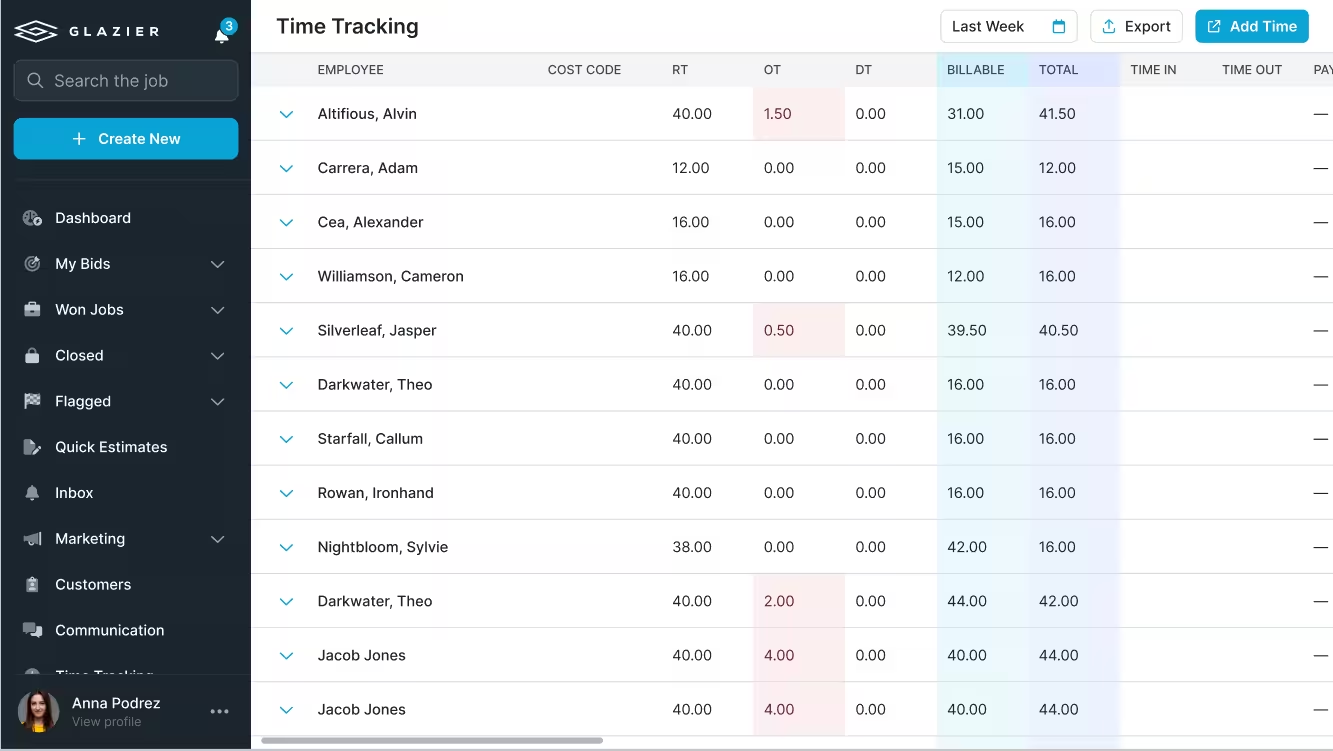
In Glazier, geolocated time tracking sits in the app your crews already use. Techs clock in within a radius of the job site, and the hours post to the job and its cost code.
Hours export straight into your payroll solution. Residential and service crews get the same thing with geolocation time tracking.
Glass and materials: committed at the PO, actual at payment
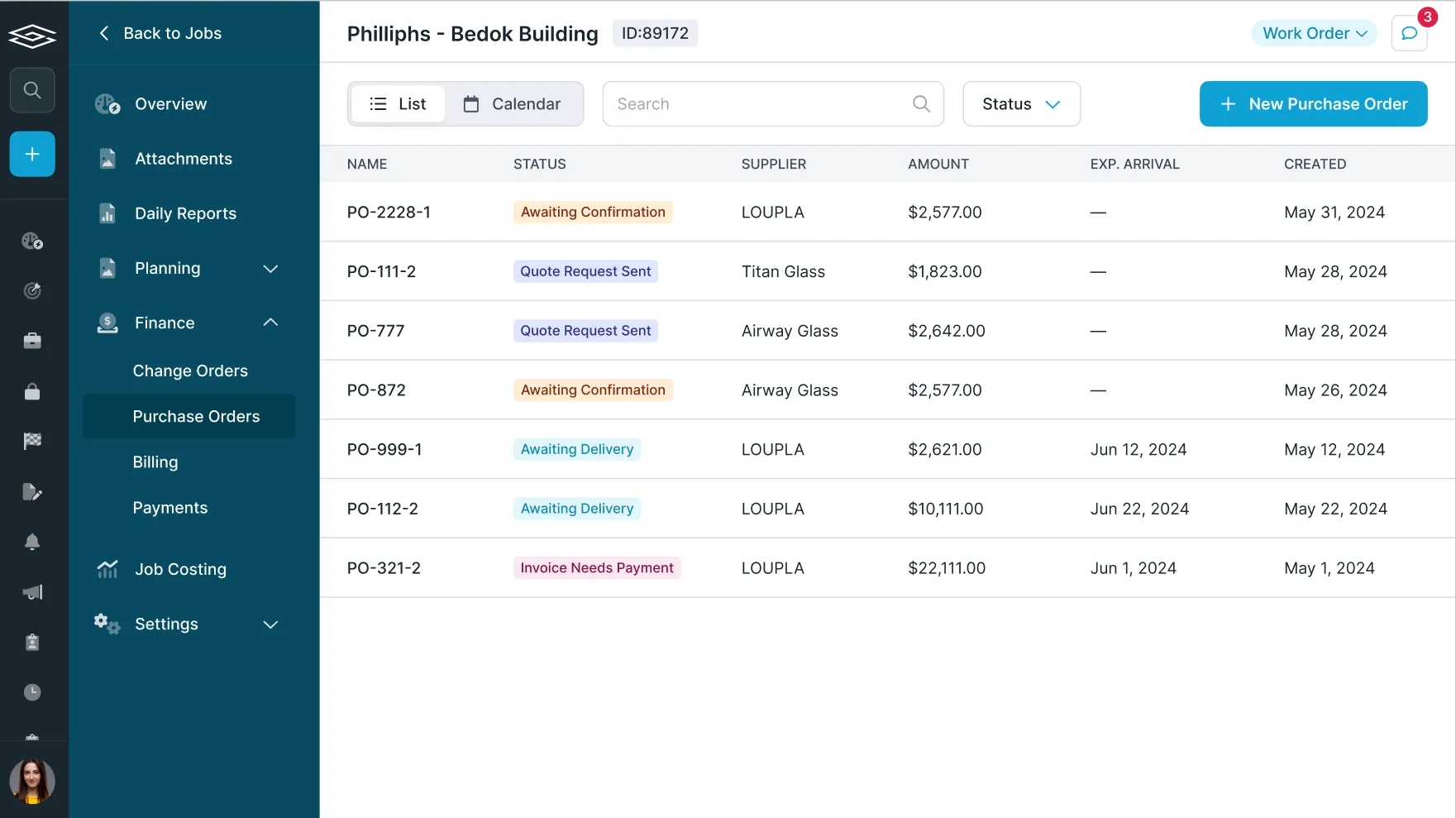
Most shops send POs by email and drop them in a folder, so nobody can see what is committed on a job. On a large job with hundreds of POs, that hides cost until the bills arrive.
Purchase order tracking sends each PO and confirms it with an arrival date. The job costing screen records a committed cost when the PO is raised and the actual when it is paid, with glass, metal, labor and freight broken out.
You can also upload supplier invoices and sync them to QuickBooks. Our guide to tracking purchase orders goes deeper.
PO receiving lets the person at the truck check sizes and receive in real time. Inventory management reserves stock to a specific job, so you stop reordering material you already have.
Change orders: tracked until they are billed
Change orders are easy to write and easy to lose. A field extra that never reaches the invoice is margin you worked for and did not collect.
Glazier tracks each change order from issued to approved to completed. It flags approved work that has not been billed yet, and the change order flows into your AIA billing and schedule of values.
The live view: margin while the job is running
Most shops find out a job lost money at closeout. By then the crew is gone and the invoice has been sent.
Job costing compares the original budget with committed and actual cost while the job runs. Here is how that plays out on an example commercial storefront job, budgeted at 140 labor hours and $159,000 in cost:
- Partway through the install, job costing shows 126 of the 140 labor hours used and $144,000 of the $159,000 spent. The hours came from crew clock-ins at the job site, with no timesheet entry.
- The glass PO posted as a committed cost the day it was issued, so the owner reads margin against what has been ordered, not only what has been paid.
- That afternoon the GC approves an extra lite. Change order tracking flags it as approved and not yet billed.
The outcome: the owner sees labor at 90 percent of budget while the install is still running. They ask the foreman about the remaining work before the crew spends another day, and the extra lite goes onto the next pay application instead of being forgotten.
.avif)
Pay applications: billed from the job
Manual billing forms every month mean the numbers in the pay app and the numbers on the job drift apart.
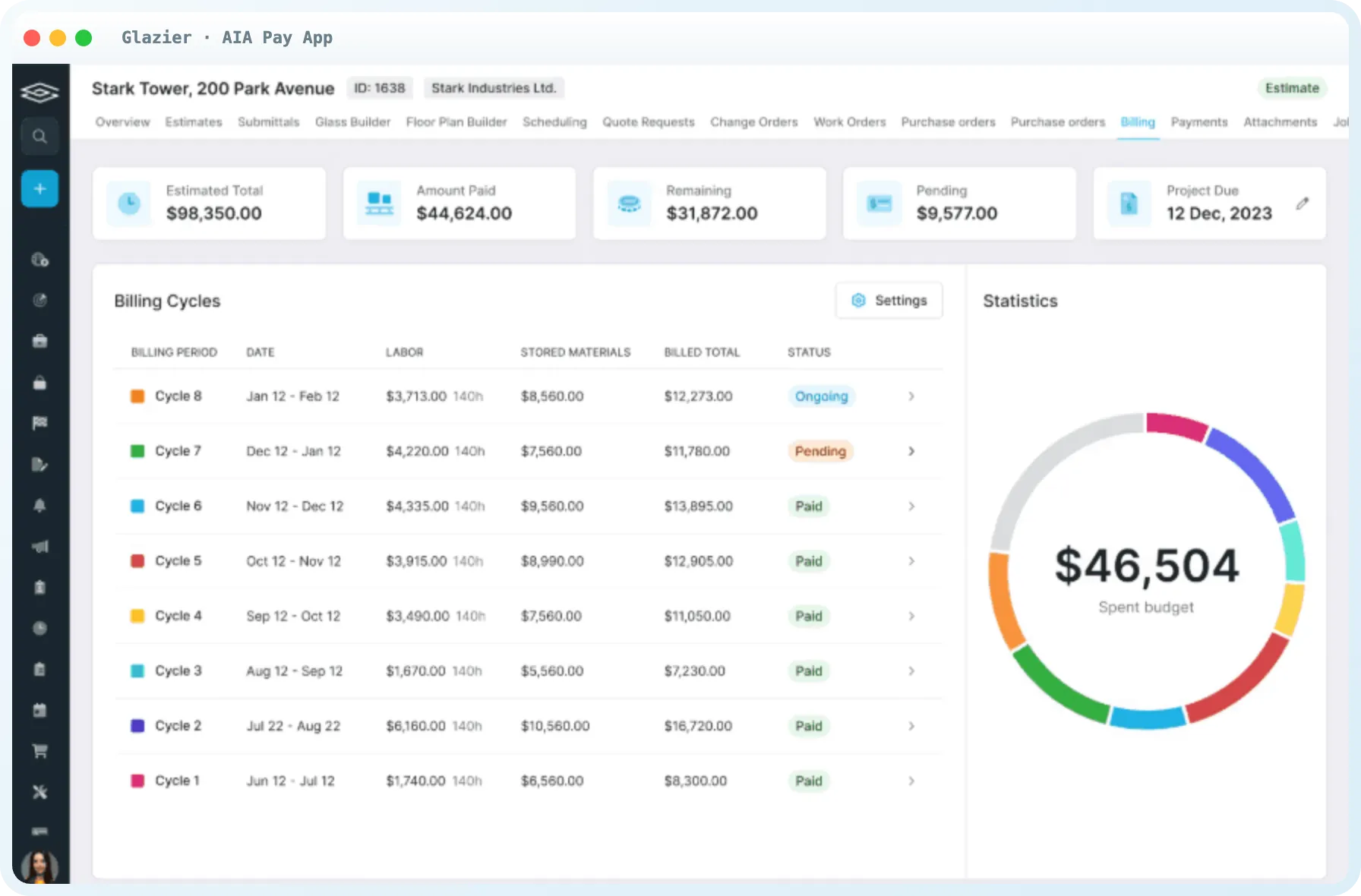
Many commercial jobs bill on the AIA G702 payment application, filed with a G703 continuation sheet that breaks the contract sum into a schedule of values.
Glazier's AIA and progress billing builds the schedule of values from the estimate and generates the G702 and G703 automatically. You bill by phase and percent complete, tied to field-reported progress, and retainage is tracked per line. If AIA billing is new to you, see how AIA billing works.
Residential and service jobs: the job becomes the invoice
Residential and service work lives on credit cards, and billing should not be a second round of data entry.
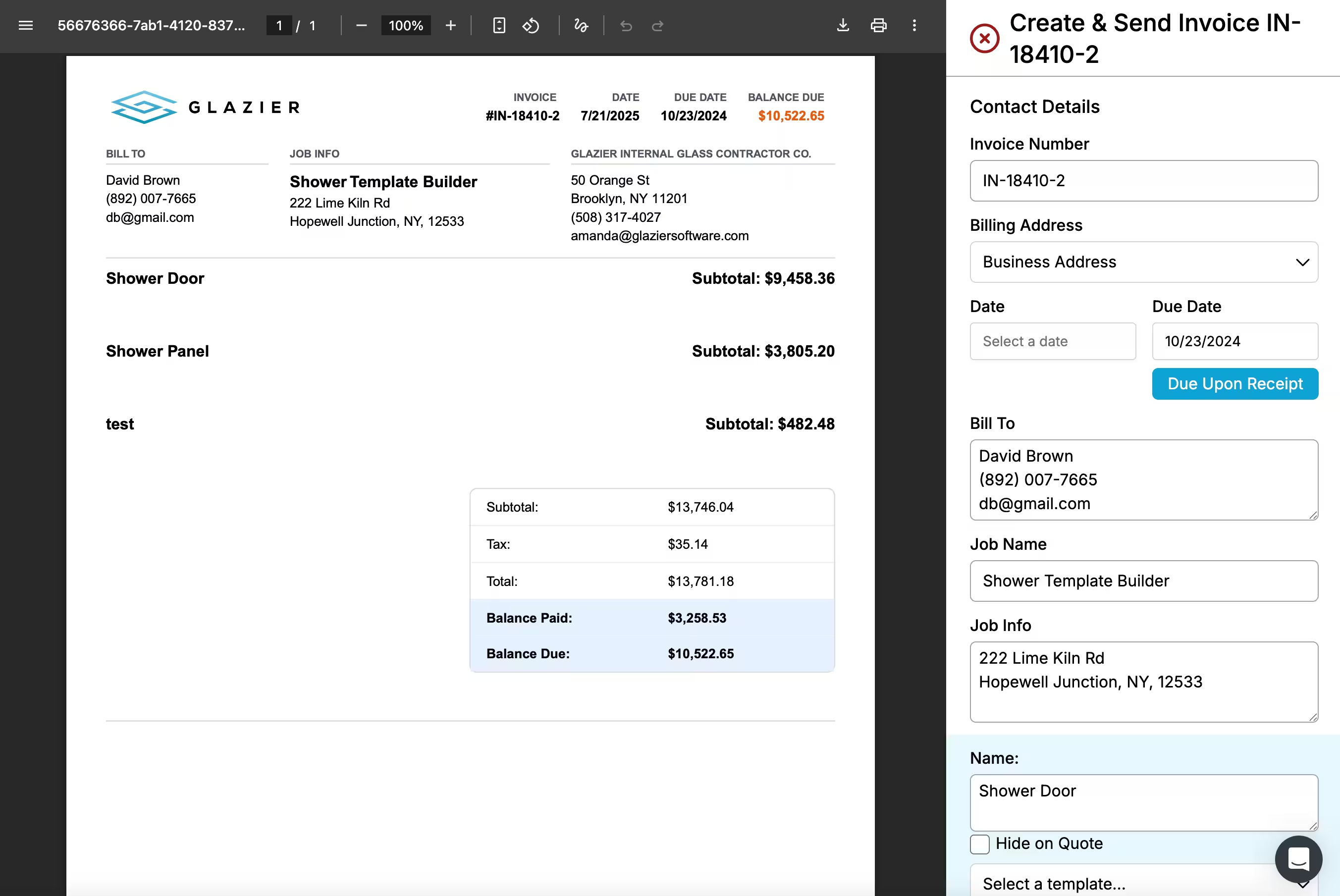
With embedded payments, you take the card in the field or at the front desk, keep a card on file for repeat customers, and put a pay link on every invoice. Invoicing generates the invoice from the job: line items, materials and labor roll in, and it goes out branded by email or text.
Residential job costing then shows material, labor and overhead per job, live while the job is open. It also shows which job types, techs and customers are profitable, and which work you should stop taking.
Accounting: payments and line items in QuickBooks
Costs only help if the books agree with them. Re-keying invoices and payments is where they stop agreeing.
Glazier's accounting sync keeps invoices, payments and line items in sync with QuickBooks Online or Desktop automatically. We keep your accounting accurate; we do not replace it. Residential accounts get the same sync through accounting sync for service work, and our guide to QuickBooks integration for glass companies covers the setup.
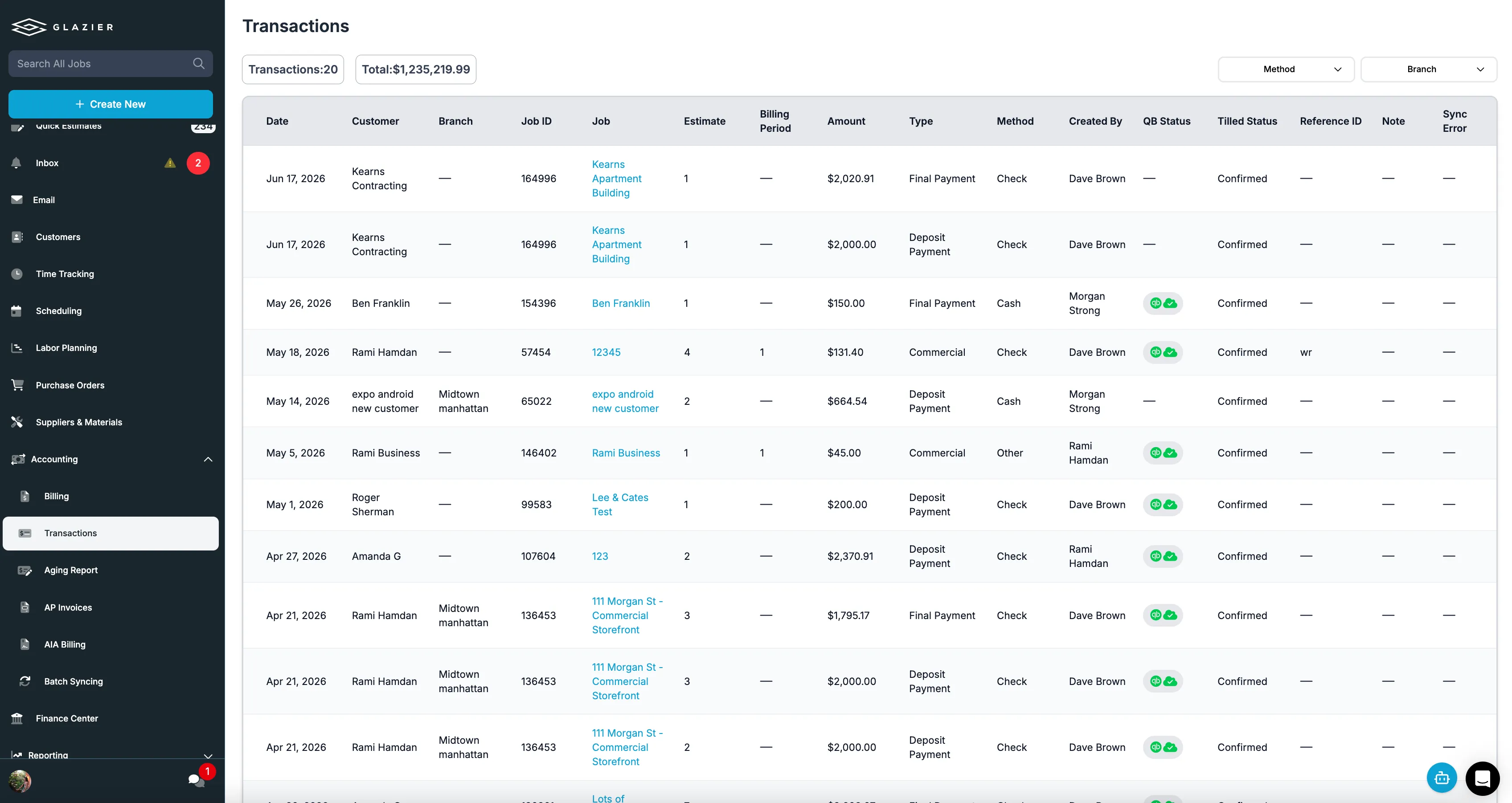
Want to see a commercial storefront job go from crew clock-ins to the pay application in one record? Book a Glazier demo and see the whole job in the product.
Job costing software versus a spreadsheet
A spreadsheet can do job costing, and if you have nothing today it is a good place to start. Give every job a row with the quoted price, then add labor hours, glass and material costs and any extras as they happen, and compare the total with what you billed.
The limit is that a spreadsheet only knows what someone types into it. Hours come from timesheets at the end of the week, glass costs from invoices at the end of the month, and extras from whoever remembers them. By the time the row is complete, the job is usually finished.
Software built for glass closes that gap by taking the costs from the work itself: hours from where the crew clocked in, material costs from the purchase order, and extras from the change order.
What to ask before you choose
Before you book demos, pick one real job from last month that you think lost money. Ask each vendor to walk that job through their system and show you where each cost would have appeared. A few things to check:
- Do labor hours post to the job automatically, including travel, or does someone enter them?
- Does a purchase order show up as a committed cost on the job before the supplier's bill arrives?
- Can you track every change order through to billed, and does approved work that has not been billed get flagged?
- Can you see margin by job, by tech and by customer, not just in total?
- Does it sync with your accounting software? If you use QuickBooks, see how a QuickBooks integration works for glass companies.
Where glazing jobs lose margin
Most glass shops know their overall profit. Far fewer know which jobs produced it, which is the question job costing for glass companies exists to answer. A busy month can hide jobs that lost money behind the ones that made it, and the shop keeps quoting the losing kind of job the same way.
Margin on a glass job rarely disappears in one big mistake. It leaks through small costs that nobody connects to the job at the time.
A re-measure because the first one was wrong costs a trip. A remake because the glass was ordered to the wrong size costs the glass, the fabrication and a second install. Labor that runs two hours over on each of several jobs adds up to a week of crew time by the end of the month.
The most common leak is work done and never billed. A customer asks for an extra mirror or a hardware change on site, the crew does it, and the office never hears about it. The job looks profitable on paper while the real margin is lower than anyone thinks.
Why the timing matters
Job costing that arrives after the job is closed tells you what went wrong. Job costing that updates while the job is running lets you fix it.
If you can see on day two that labor is already at the estimate, you can ask why before the crew spends another day. If a change order is logged on the job when it happens, it goes onto the invoice instead of being forgotten. That is the difference between a report and a tool.
To see job costing run on one of your own jobs, book a Glazier demo.
Frequently Asked Questions
What is job costing for a glass company?
Job costing means tracking what each job actually costs, labor, glass, materials and any extra work, against what you quoted and billed for it. For a glass company it answers the question an overall profit figure cannot: which jobs, crews and customers make money, and which ones only look busy.
What should glass job costing software track?
At minimum: labor hours tied to the job, glass and materials as they are ordered and as they are paid for. These include change orders and field add-ons, and what has been billed. Each of those needs to land on the job automatically, because costs that are typed in at the end of the week arrive too late to change anything.
Why do glazing jobs lose margin?
Usually in small amounts nobody sees at the time: a re-measure, a remake from a wrong size, labor that runs over the estimate. These include extra work in the field that never makes it onto the invoice. Each one looks minor on its own, and together they are the difference between the quoted margin and the real one.
Can I do job costing in a spreadsheet?
Yes, and it is a good start if you have nothing. Give each job a row with the quoted price, then add labor hours, glass and material costs and any extras as they happen. The limit is that it only works if someone updates it every day, and the numbers are only as current as the last update.
Explore Our Success Stories

Streamline your glazing operations.
Book a demo today and find out how Glazier can transform your glass business.
The all-in-one platform built for glass & glazing — quoting to cash, powered by AI.