
Management
Glazier Reporting Software: 6 Reports to Check Weekly
Glazier reporting software should show six things every week: job margin, unbilled extras, open quotes, open POs, crew hours and what is owed to you.
11
min read
•
October 11, 2026

Glazier reporting software is for glass shop owners and project managers who want to know which jobs make money, what has not been billed and who owes them, without building a report on Sunday. We built Glazier for glass and glazing businesses, so job costing, change orders, purchase orders, crew hours and billing sit on the same job and the reports come from the work itself.
What to look for in glazier reporting software
When you compare systems, ask to see these reports on a real job rather than on a demo account.
Reports built from the work. Hours should come from where the crew clocked in, costs from the purchase order and extras from the change order. If a report needs someone to type in last week's numbers, it will be late.
Job-level detail. A company total hides the jobs that lose money. You should be able to see cost against budget on each job while it is still running.
Answers without a spreadsheet. An owner should be able to ask a question about the business and get an answer from the live data.
Field records. On commercial work, daily reports from the site are both a progress record and your evidence if a dispute comes up later.
Accounting sync. Billing and payment data should come from your accounting system automatically. If you use QuickBooks, see how a QuickBooks integration works for glass companies.
How Glazier handles reporting
Each of the six weekly reports below comes from one Glazier record, and every screen shown is the one an owner or project manager opens to read it. We start with margin and work through to money owed, then finish with a typical Monday.
Margin on open jobs: cost against budget while the job runs
The pain is finding out at closeout that a job lost money. In Glazier, the job costing screen posts committed costs when a PO is created and actual costs when it is paid, with glass, metal, labor and freight broken out against the original budget. You open the job, choose Job Costing and read the margin as it moves.
.avif)
Residential and service shops get the same view by job type, tech and customer, so a customer whose jobs always run thin shows up in residential job costing.
Crew hours against estimate: time that lands on the job
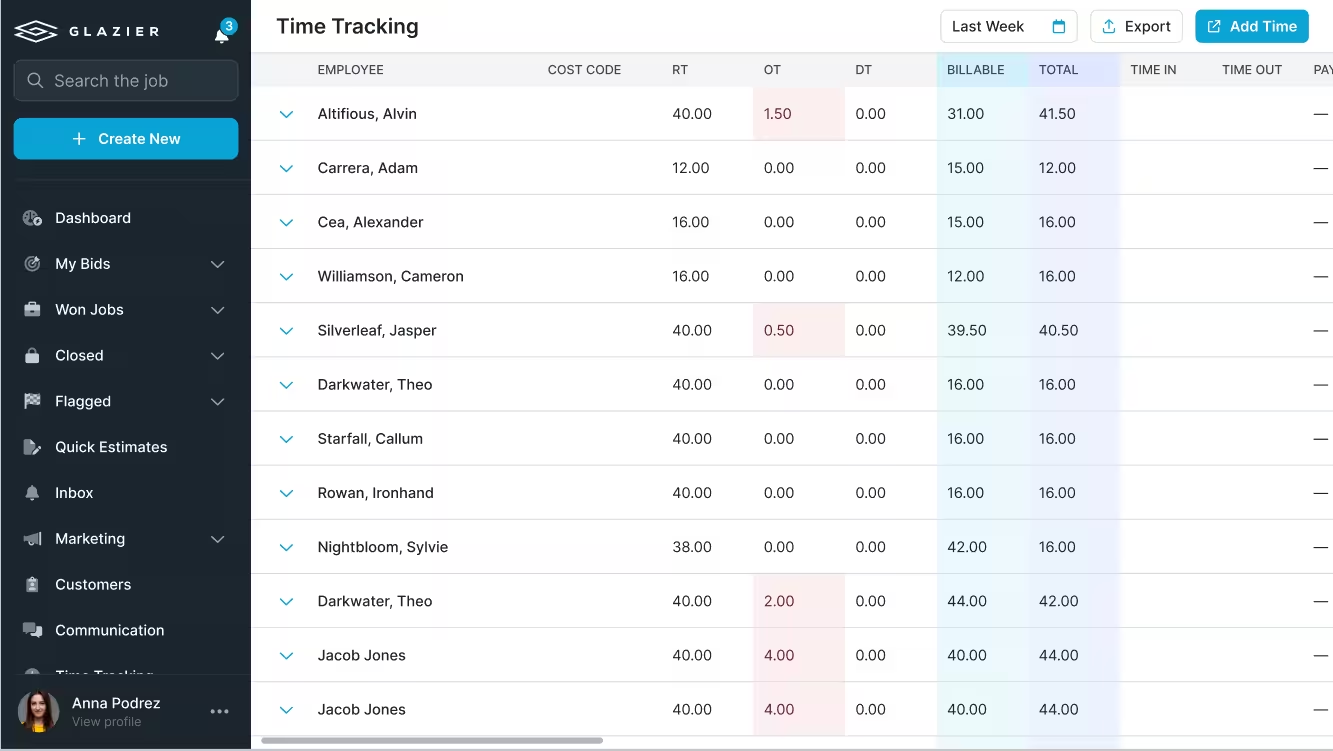
The pain is labor that nobody adds up until the job is over. Our geolocated time tracking lets techs clock in within a radius of the job site on the app they already use, and the hours feed real-time job costing tied to your cost codes. The time tracking screen lists each employee's hours for the week, and you can export them to payroll.
The labor hours trend on the job costing screen above puts budgeted hours next to actual hours, which is the check on a job that is running long.
Unbilled change orders and extras: tracked through to billed
The pain is extra work done on site that never reaches an invoice. Glazier's change order tracking follows each change order from issued to approved to completed and flags approved work that has not been billed yet. Approved change orders flow into your AIA billing and schedule of values.
Many commercial jobs bill on the AIA G702 payment application, filed with a G703 continuation sheet that breaks the contract sum into a schedule of values.
Open purchase orders: every PO tracked with an arrival date
The pain is a late glass order that moves the install date. With purchase order tracking you send and confirm each PO with an arrival date, and you can plan POs against install dates. Our guide to tracking purchase orders covers the process behind it.
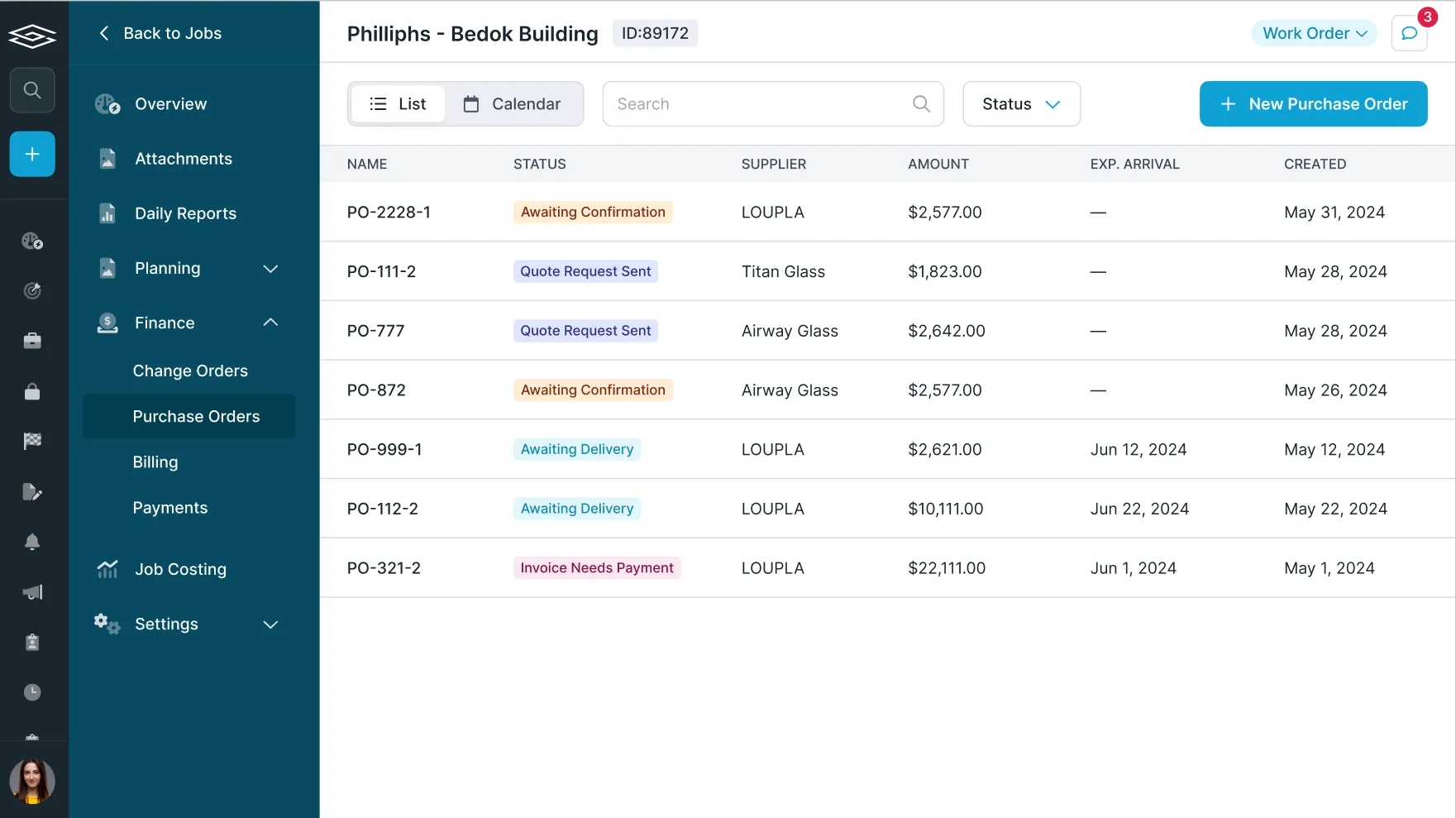
When the glass reaches the truck, PO receiving lets the person at the dock record breakage, check sizes and receive in the app.
Open quotes: one pipeline with an owner on every record
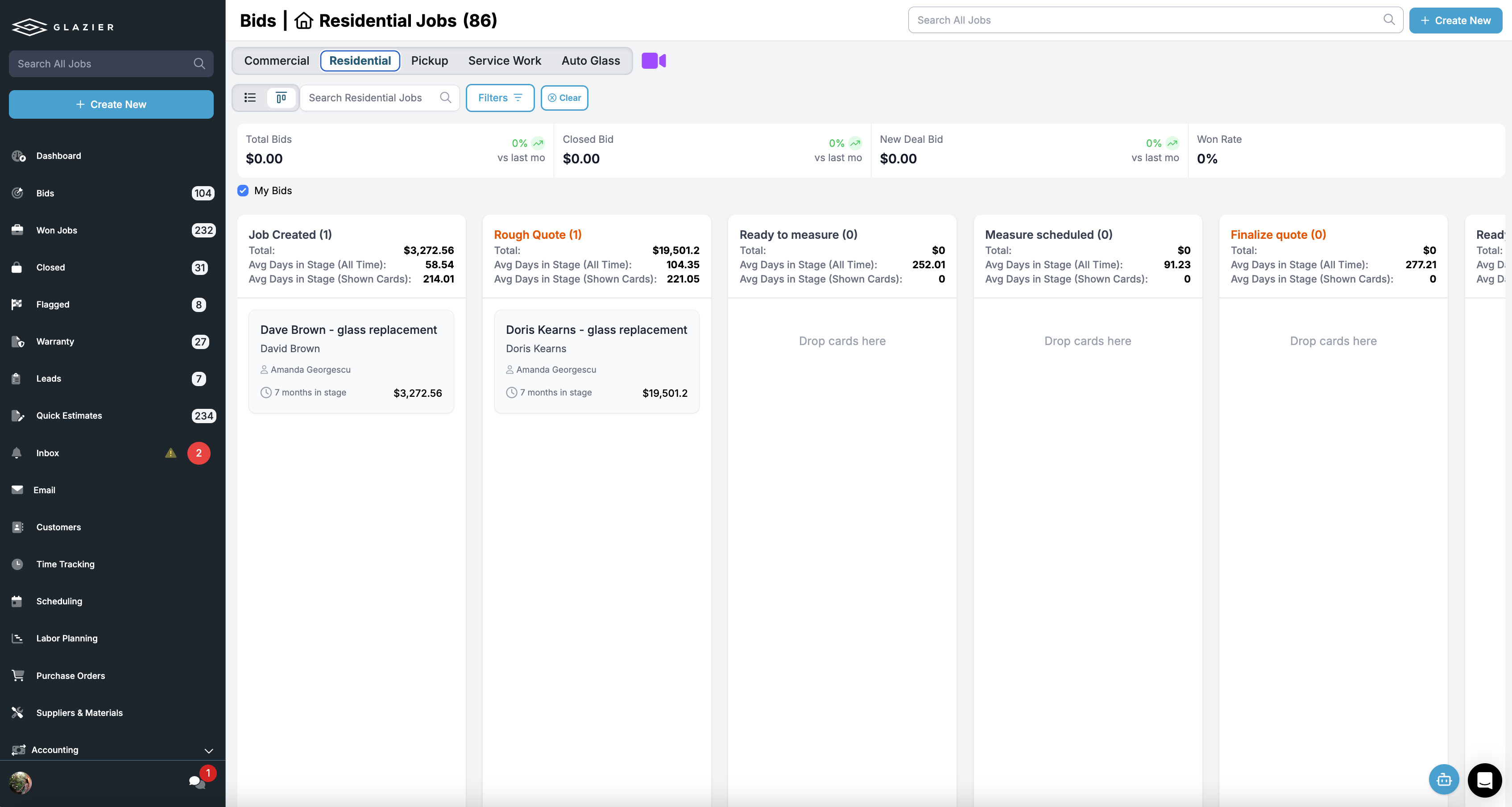
The pain is a quote that dies because nobody followed up. In residential and service work, the lead and bid pipeline shows every lead and open quote in one pipeline, with an owner and a next step on each record. On commercial work, the project pipeline shows every active project and its current stage.
Money owed to you: overdue invoices and pay apps
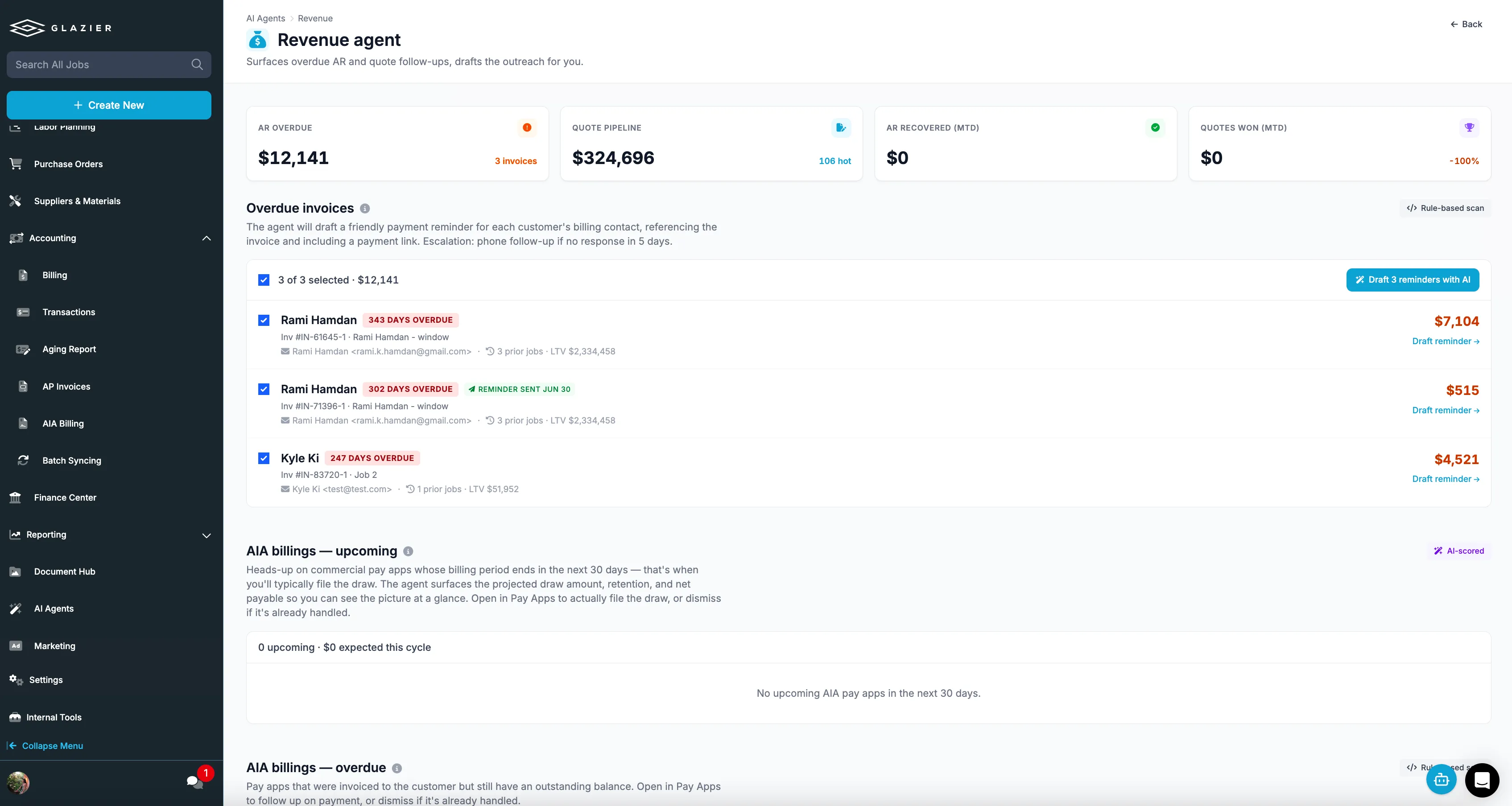
The pain is invoiced work that sits unpaid. Our Revenue Agent chases overdue invoices with context-aware emails, so collections do not slip. For contract work, AIA and progress billing generates G702 and G703 pay applications from the job, with retainage tracked per line; our guide to how AIA billing works explains the forms.
Ask for any of it in plain English
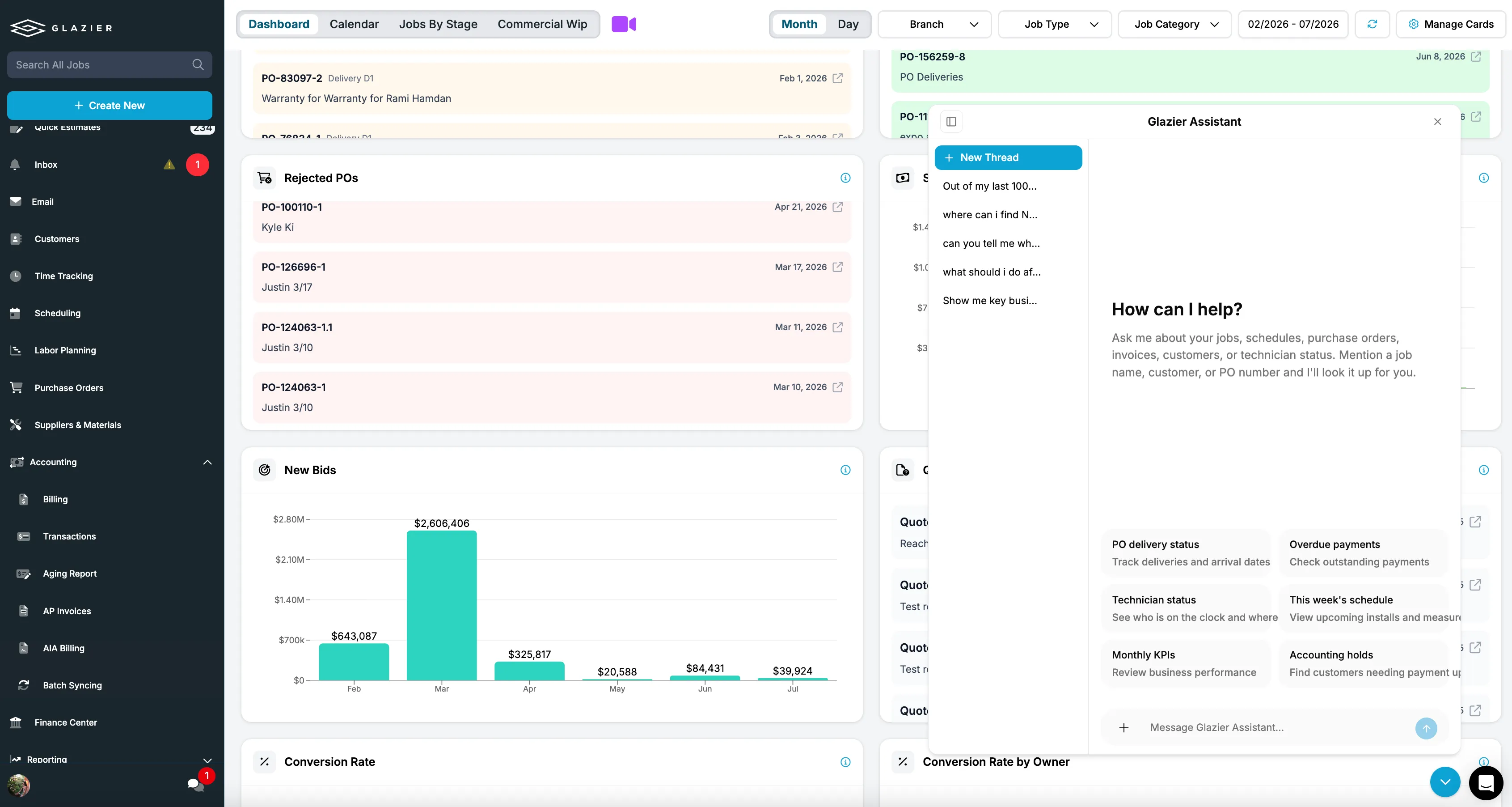
The pain is not knowing which screen holds the answer. Glazier AI chat answers business questions in plain English from your own data, such as purchase order delivery status, overdue payments, technician status and monthly KPIs.
Field records: daily reports you can defend later
The pain is a dispute two years on about what happened on a given day. Daily reports use a format and checklist you design, and a tech or foreman generates a PDF from field activity, signed off on site with photos.
Accounting sync: billing data without re-keying
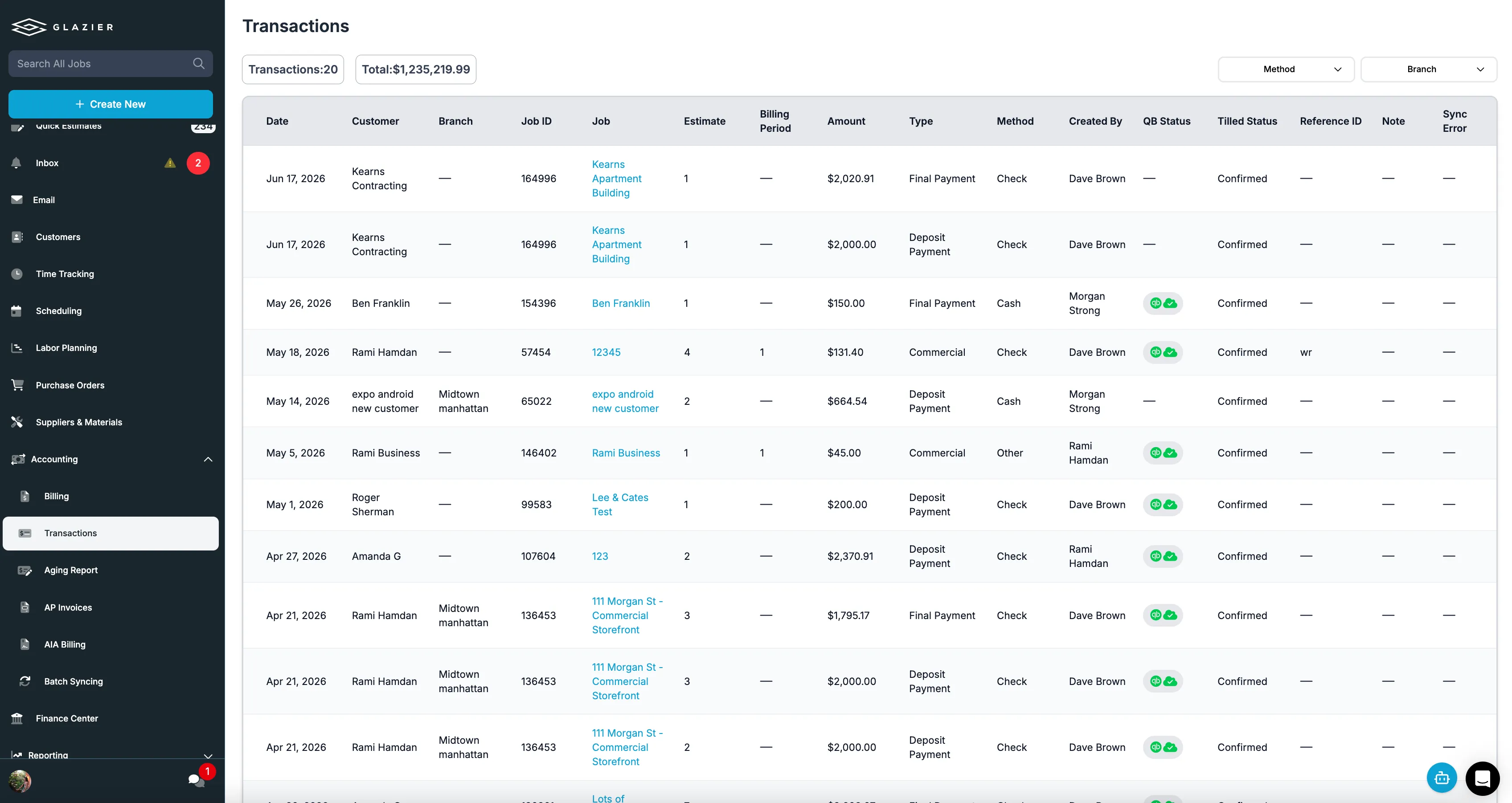
The pain is billing numbers that live in QuickBooks and know nothing about the job. Accounting sync keeps invoices, payments and line items in step with QuickBooks Online or Desktop automatically, so nobody re-keys them.
A Monday morning, report by report
The numbers here are made up and the screenshots above show sample data, so they will not match. Take a $48,000 storefront job that is halfway through install, with a labor estimate of 120 hours.
The owner asks Glazier AI which open jobs are over their labor estimate. The job costing screen shows 96 of the 120 estimated hours already logged, which is 80 percent of the labor at the halfway point. That is a conversation with the foreman on Monday, not a surprise at closeout.
Change order tracking lists two approved change orders on the same job, $2,400 and $3,100, that have not been billed. The owner bills the $5,500 that week. The purchase orders list shows the glass on a PO marked Awaiting Delivery with an arrival date the day before the install, and the Revenue Agent is chasing a $6,200 invoice that is 41 days overdue.
The weekly report the owner used to build by hand is now a check.
Want to see a $48,000 storefront job go from logged hours to a billed change order in one record? Book a Glazier demo and see the whole job in the product.
The six reports a glass shop owner should see every week
These six cover most of what an owner needs to run a glazing business from one screen. Each one answers a question that total monthly profit cannot.
| Report | The question it answers | Where the data comes from |
|---|---|---|
| Margin on open jobs | Which running jobs are over budget? | Quoted price, labor hours, glass and material costs |
| Unbilled change orders and extras | What work did we do that we have not invoiced? | Change orders logged in the field |
| Open quotes | Which quotes are waiting on a follow-up? | The quoting pipeline |
| Open purchase orders | What glass is ordered and not yet received? | Purchase orders and receiving |
| Crew hours against estimate | Which jobs are running long on labor? | Time tracked on the job |
| Money owed to you | Who has been invoiced and not paid? | Billing and accounting |
Margin on open jobs
This is the report that pays for the software. It compares what each open job was quoted at with what it has cost so far in labor, glass and materials. A job that is already at its labor estimate halfway through install shows up here while there is still time to ask why.
Look at it by job first, then by crew and by customer. A customer whose jobs always run thin is a pricing decision, not a scheduling one.
Unbilled change orders and extras
Extra work agreed on site is the easiest money a glass shop loses. A customer asks for an extra mirror or a hardware change, the crew does it, and the office never hears about it. A weekly list of change orders that have been logged but not invoiced catches that before the job is closed and the final bill has gone out.
Open quotes
Quotes rarely die because the customer said no. More often nobody followed up. A list of open quotes sorted by age, with the value of each, tells you where to spend an hour on the phone this week.
Open purchase orders
On commercial work, a late glass order moves the install date. A report of purchase orders that are placed but not received, with the job each one belongs to, shows which jobs are at risk before the crew turns up to an empty rack. For more on the process behind it, see how to track purchase orders without losing your mind.
Crew hours against estimate
Labor is where glazing estimates are most often wrong, and it is invisible until someone adds up the timesheets. When hours land on the job as they are worked, this report shows which jobs are running long while they are still open.
Money owed to you
Revenue only counts once it is collected. This report lists what has been invoiced and not paid, oldest first. For contract glaziers who bill in stages, it should include retainage and progress billing as well; see how AIA billing works.
Why reports go stale in a spreadsheet stack
The six reports above are not hard to define. They are hard to keep current when the data lives in different places.
- Hours arrive from timesheets at the end of the week.
- Glass costs arrive from supplier invoices at the end of the month.
- Change orders arrive from whoever remembers to mention them.
- Invoices and payments live in the accounting system, which knows nothing about the job's labor.
Someone can pull all of that together, and in many shops the owner does it on a Sunday. The trouble is that by the time the report is built, the week it describes is over.
A report that explains last month's loss is useful once. A report that shows this week's problem is useful every week.
To see these reports built from one of your own jobs, book a Glazier demo.
Frequently Asked Questions
What is glazier reporting software?
Glazier reporting software turns the day-to-day work of a glass business into reports an owner can read in a few minutes. The useful kind builds those reports from the work itself, quotes, jobs, purchase orders, crew hours and billing, so nobody has to compile them at the end of the week.
What reports should a glass shop owner look at every week?
Six cover most of it: margin on open jobs, change orders and extras not yet billed, open quotes waiting on a follow-up. These include open purchase orders, crew hours against the estimate, and money owed to you. Each one answers a question that an overall profit figure hides.
Can I run reports for a glass business from spreadsheets and QuickBooks?
You can get some of them. QuickBooks knows what was invoiced and paid, and a spreadsheet can track quotes or jobs if someone keeps it current. What neither does well is connect them, so a report that needs hours, materials and billing on the same job takes someone an afternoon to build.
How often should a glazing business review its reports?
Weekly for the business-level view, and daily for anything tied to an open job. Margin, hours and unbilled extras change while the job is running, and a report that arrives after the job has closed can only explain the loss, not prevent it.
Explore Our Success Stories

Streamline your glazing operations.
Book a demo today and find out how Glazier can transform your glass business.
The all-in-one platform built for glass & glazing — quoting to cash, powered by AI.